
What Model Does AI Mode on Google Use? Everything You Need to Know
Find out what AI model powers Google AI Mode, how Gemini 3 works behind AI search, its key features, and how to access it.
Google AI Mode is the latest search feature from Google that uses artificial intelligence to answer user queries directly. Unlike traditional Google Search that only displays a list of links, AI Mode provides concise, accurate, and well-structured answers — complete with references from various sources across the internet.
The most frequently asked question since the launch of this feature is: what AI model does AI Mode actually use? The answer is Gemini 3, Google's newest and most advanced AI model, which is integrated directly into Search. This article will thoroughly explore how Gemini 3 works behind AI Mode, its standout features, and what makes it different from other AI search tools.
What Is Google AI Mode?
Google AI Mode is an experimental search mode that allows users to ask questions in natural conversational form. Instead of typing keywords and browsing through search results one by one, you can write a complete question — and AI Mode will provide an answer compiled from various trusted sources.
This feature was first launched as part of Google Labs experiments and is now available more broadly. AI Mode can be accessed through a dedicated tab on the Google Search results page, or directly from Google Search ↗ by activating this mode. The concept is similar to AI assistants like ChatGPT or Claude, but integrated directly into the search engine used by billions of people.
The AI Model: Gemini 3
The short answer: Google AI Mode uses Gemini 3, the newest AI model from the Gemini family developed by Google DeepMind ↗. This marks the first time Google has brought its latest Gemini model to Search on day one of its launch.
Gemini 3 comes in several variants. The most relevant for AI Mode is Gemini 3 Pro — an advanced model that users can select through the "Thinking" dropdown menu in the AI Mode interface. For lighter tasks, Google also uses faster and more lightweight models to keep the search experience responsive.
Model selection is done automatically by the system. Complex questions requiring deep reasoning are routed to Gemini 3 Pro, while simpler questions are handled by lighter models. This approach ensures a balance between answer quality and response speed. For a complete comparison of Gemini features across tiers, also read Gemini AI Plus vs Pro Features Comparison.
Key Features of Gemini 3 in AI Mode
Gemini 3 brings several significant improvements that make AI Mode far more capable than its predecessors. Here are the main features:
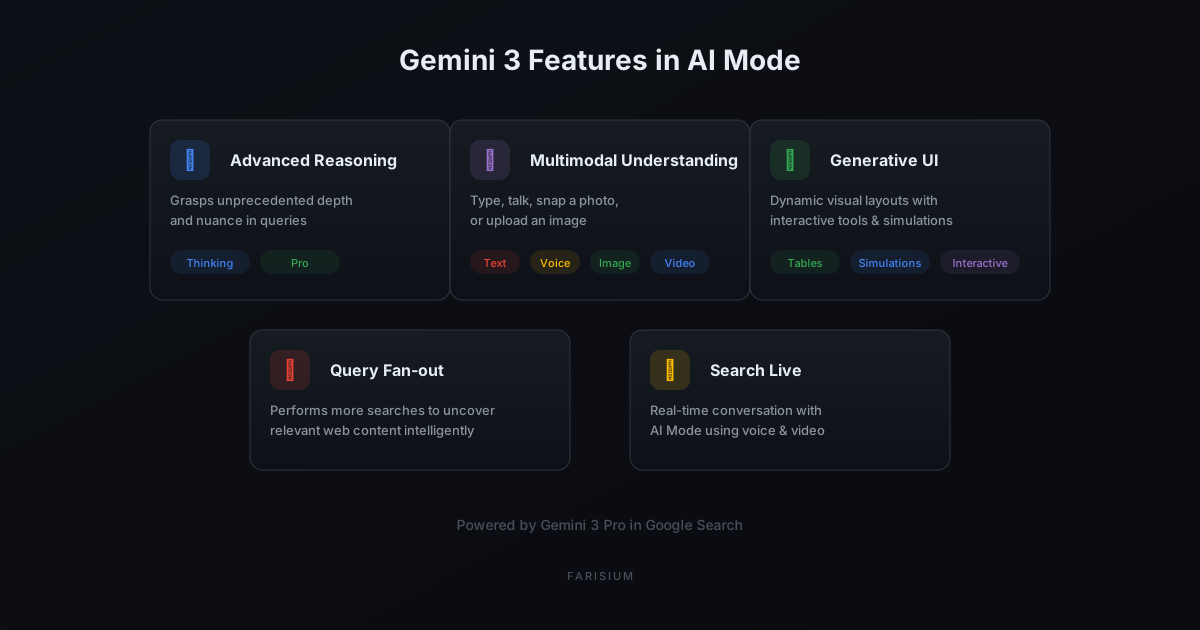
- Advanced Reasoning — Gemini 3 can grasp the depth and nuance of complex questions, including those requiring layered reasoning or multi-faceted analysis.
- Multimodal Understanding — AI Mode can process text, voice, images, and video simultaneously. Users can type questions, speak directly, take photos, or upload images as question context.
- Generative UI — Gemini 3 can automatically create dynamic visual layouts, including comparison tables, interactive graphs, and simulations tailored to answer your specific question.
- Enhanced Query Fan-out — This search technique allows AI Mode to run more searches in parallel to find relevant web content, even content that conventional search might miss.
- Search Live — A real-time conversation feature that allows users to speak directly with AI Mode, including sharing visual context through the device camera.
How AI Mode Works Behind the Scenes
When you submit a question to AI Mode, several processes happen simultaneously. First, Gemini 3 analyzes your question to understand its intent and context. Then, the query fan-out technique is executed — the AI does not search for just one keyword, but runs many search variations at once to find the most relevant and credible information.
After gathering information from various sources, Gemini 3 compiles the results into a coherent and easy-to-understand answer. Every claim in the answer is accompanied by source references, so you can independently verify the information. This process happens in seconds, even though it involves highly complex computation behind the scenes.
What's particularly interesting is that Gemini 3 also supports generative UI — meaning the model can create custom visual layouts to answer your question. For example, if you ask about comparing mortgage rates, AI Mode can instantly build an interactive calculator within the answer. Or if you ask about a physics concept, it can create a visual simulation you can manipulate.
Personal Intelligence: Tailored Answers
One of the most interesting features of AI Mode is Personal Intelligence — the ability to provide personalized answers based on data from your Google account. By connecting specific Google apps, AI Mode can offer recommendations that are more relevant to your preferences and plans.
For example, AI Mode can provide a daily agenda summary from Google Calendar ↗, recommend restaurants based on your search history, or provide weather updates tailored to your location. All of this is done while maintaining user privacy — you have full control over what data is shared.
Frequently Asked Questions (FAQ)
What model does Google AI Mode use?
Google AI Mode uses Gemini 3, Google's newest AI model. The most commonly used variant is Gemini 3 Pro, available to Google AI Pro and AI Ultra subscribers. For simpler questions, the system also uses lighter models for faster responses.
Is AI Mode free to use?
AI Mode is available to users in the United States, with full features for Google AI Pro ($19.99/month) and AI Ultra subscribers. Free users can access AI Mode with limited capacity. Availability in other countries is still being expanded.
How do I access AI Mode?
You can access AI Mode through the "AI Mode" tab in Google Search results, or by visiting google.com/ai. Make sure you are logged into a Google account and in a supported region. For the Thinking feature with Gemini 3 Pro, select that option from the model dropdown menu.
Are AI Mode answers always accurate?
Not always. AI Mode, like all generative AI, can potentially produce information that is not entirely accurate. Google recommends users always verify important information through the referenced sources. This feature is still experimental and continuously being improved.
Conclusion
Google AI Mode uses Gemini 3 — Google's most advanced AI model — to deliver a smarter, more interactive, and more personal search experience. With advanced reasoning, multimodal understanding, generative UI, and Search Live, AI Mode is not just a minor update to Google Search — it represents a fundamental shift in how we find information on the internet.
As part of the Farisium ecosystem that continuously follows the latest AI developments, we recommend you try AI Mode and experience the difference firsthand. If you are interested in AI image generation that also leverages the latest AI technology, visit the Farisium Anime Generator to create high-quality anime illustrations. Also read What Is Open Source AI? to understand the fundamentals behind modern AI technology.
Explore AI Tools with Farisium
Visit Farisium AI ToolsPertanyaan Umum
Google AI Mode uses Gemini 3, Google's newest AI model. The most commonly used variant is Gemini 3 Pro, available to Google AI Pro and AI Ultra subscribers. For simpler questions, the system also uses lighter models for faster responses.
AI Mode is available to users in the United States, with full features for Google AI Pro ($19.99/month) and AI Ultra subscribers. Free users can access AI Mode with limited capacity. Availability in other countries is still being expanded.
You can access AI Mode through the "AI Mode" tab in Google Search results, or by visiting google.com/ai. Make sure you are logged into a Google account and in a supported region. For the Thinking feature with Gemini 3 Pro, select that option from the model dropdown menu.
Related Articles
What Is Open Source AI? Definition, Platforms, and How to Choose
Learn what open source AI is, its differences from proprietary AI, popular platforms like TensorFlow and PyTorch, and how to choose the right open source AI solution.
AI for E-commerce Business: Strategies and Tools 2026
Boost e-commerce sales with AI. Learn personalization strategies, chatbots, supply chain optimization, and AI tools for online businesses.
Future of AI in Indonesia: Opportunities and Challenges 2026
Explore the future of AI in Indonesia. Opportunities, challenges, and the most affected sectors by artificial intelligence in 2026 and beyond.

M. Faris Deni K.
Founder & Developer of Farisium. Writing about AI, technology, and platform development.