
Why Does Your AI Agent Stop Working? How to Fix Infinite Loops and Stuck Loops
Learn the causes and how to fix ai agent stuck loop issues practically. Complete with guard clause, circuit breaker, timeout, and fallback strategy solutions.
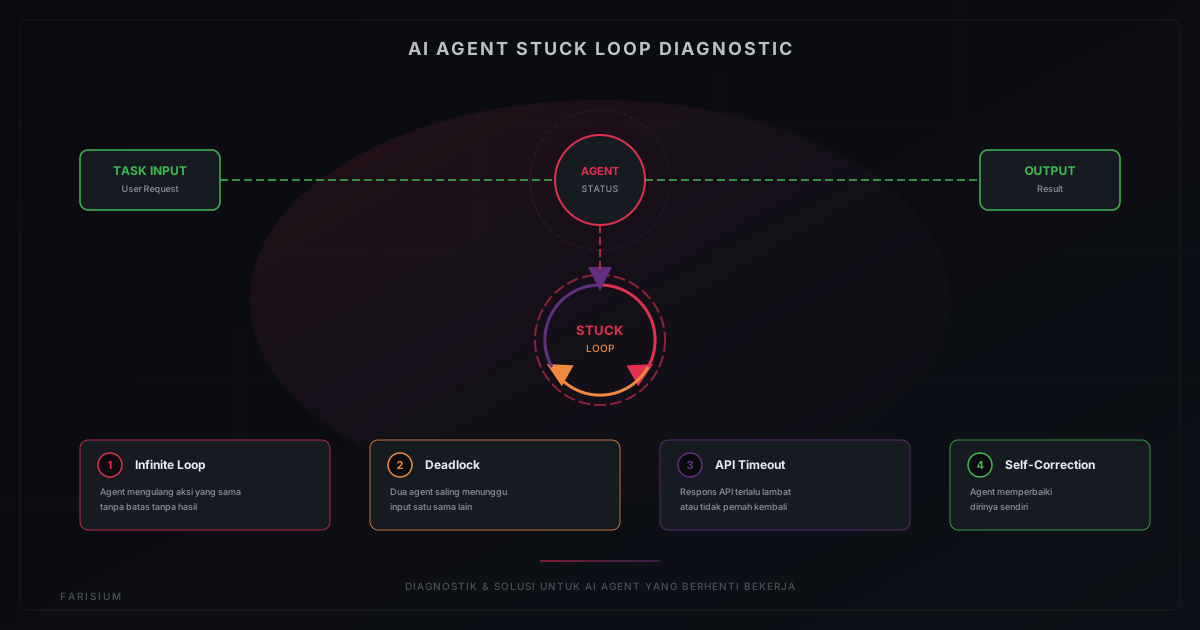
Ever run an AI agent — whether for work automation, chatbots, or complex workflows — only to have it suddenly stop responding, repeat the same action over and over, or freeze entirely? You are not alone. Stuck loops are one of the most common and frustrating problems faced by developers and AI agent users in 2026.
This is not just a minor nuisance. When an AI agent enters a stuck loop, it can consume computational resources without results, drain expensive API quotas, and even corrupt data or compromise system integrity. This article provides an in-depth explanation of why AI agents stop working, the types of stuck loops you need to know about, and most importantly — [[how to fix ai agent stuck loop]] issues practically and effectively.
What Is an AI Agent Stuck Loop?
An AI agent stuck loop is a condition where the AI agent gets trapped in an execution cycle that does not produce the desired result. Instead of completing the task and providing output, the agent keeps repeating the same step or a series of contradictory steps without a clear time limit.
Imagine a robot instructed to pick up a glass from a table. If the robot cannot find the glass, instead of stopping and reporting that the glass is missing, it keeps walking back and forth to the table, checking down, up, left, right — repeatedly without stopping. That is a stuck loop in an AI agent.
Types of Stuck Loops
Not all stuck loops are the same. Understanding the type helps you choose the right solution:
1. Infinite Loop
This is the most common and most dangerous type. The agent repeats the exact same action without ever stopping. Causes can include: unbounded while conditions, logic errors in decision trees, or an AI model that "forgets" it already performed a certain action. Infinite loops can drain entire API quotas and overload servers.
2. Deadlock
Occurs when two or more agents wait for output from each other. Example: Agent A waits for data from Agent B, while Agent B also waits for data from Agent A. Neither steps forward, and the entire system freezes. Deadlocks frequently occur in multi-agent systems without clear communication protocols.
3. API Timeout Loop
The agent tries to call an API that is not responding. Instead of handling the error gracefully, it keeps retrying without proper backoff. This creates a "thundering herd" where hundreds of requests fail simultaneously, burdening both the agent and the target server.
4. State Corruption Loop
The agent loses or corrupts its internal state, preventing it from continuing the task correctly. It attempts to "fix" itself but makes things worse, creating a loop where each repair attempt adds new problems.
Common Causes of AI Agent Failure
Before discussing solutions, it is important to understand the root causes. Here are the most common reasons AI agents enter stuck loops:
- Ambiguous prompts or instructions — the AI model is unsure what to do and keeps trying different approaches.
- No iteration limits — the agent is given full autonomy without a maximum number of attempts.
- Failed external dependencies — APIs, databases, or other services that do not respond trigger endless retries.
- Race conditions — multiple agent components trying to access the same resource simultaneously.
- Memory leaks or poor state management — the agent loses track of its position in the workflow.
- AI model hallucination — the model generates invalid output and keeps trying to fix it indefinitely.
How to Fix AI Agent Stuck Loops
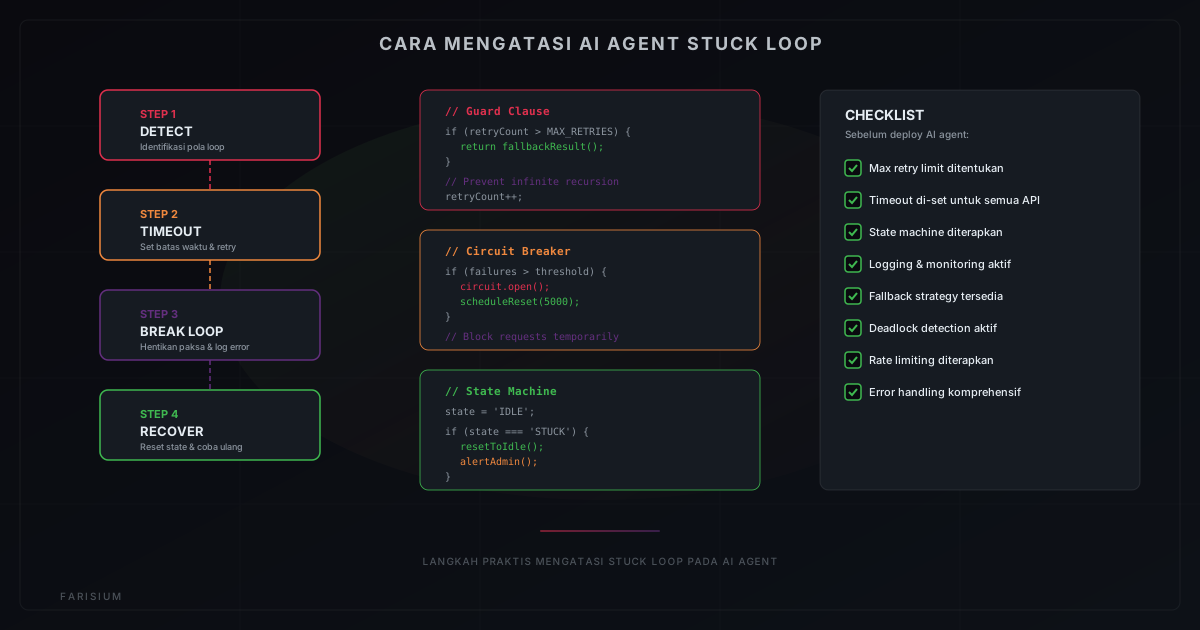
Here are practical strategies you can implement to prevent and fix stuck loops in AI agents. These approaches apply to various types of agents — from simple chatbots to complex workflow automations.
1. Implement Guard Clauses and Max Retry Limits
The most basic and most important solution: always define a retry limit. Each time the agent performs an iteration, increment a counter. When the counter reaches the maximum limit, stop execution and return a fallback result or error message. This effectively prevents infinite loops without requiring major architectural changes.
Implementation example: set max retries to 3-5 times per task. If the agent still fails after that limit, log the error and notify the admin. This approach is simple yet highly effective at preventing resource exhaustion.
2. Use the Circuit Breaker Pattern
The circuit breaker is a design pattern that "breaks" the circuit when too many failures occur. In the context of AI agents, the circuit breaker blocks all requests after a certain failure threshold is reached, giving the system time to recover before trying again. This pattern is extremely useful for preventing thundering herd effects from API timeout loops.
3. Apply Timeouts to Every Operation
Every operation performed by an AI agent — from API calls to data processing — must have a clear timeout. If the operation does not complete within the specified time, the agent should cancel it and move to the next step or return an error. Timeouts prevent agents from waiting forever on a single failed operation.
4. Use State Machines for Workflows
Instead of letting the agent determine its next step freely, define workflows as state machines with clear states: IDLE, PROCESSING, WAITING, ERROR, COMPLETED. Every transition must be valid and bounded. State machines simplify debugging because you can see exactly where the agent is "stuck".
5. Implement Logging and Monitoring
You cannot fix a problem you do not know exists. Ensure every action taken by the AI agent is recorded in logs. Use monitoring tools like Grafana, Datadog, or even simple logging to track: how many iterations the agent performs, how long each operation takes, and when errors occur. With this data, you can identify stuck loop patterns before they become major issues.
6. Use Exponential Backoff for Retries
Instead of retrying immediately after a failure, use exponential backoff — wait 1 second, then 2 seconds, 4 seconds, 8 seconds, and so on. This gives external systems time to recover and reduces load on servers. Exponential backoff is a best practice recommended by Google Cloud ↗ and AWS ↗ for all API integrations.
7. Design a Fallback Strategy
Always prepare a backup plan. If the agent cannot complete its primary task, it should have alternatives: return cached data, use a lighter AI model, or provide an informative error message to the user. A fallback strategy ensures that even when the agent fails, users still receive a useful response.
Tools That Help Fix Stuck Loops
Several tools and frameworks can help prevent and fix stuck loops in AI agents:
- LangChain — Popular framework for building AI agents with built-in retry, timeout, and error handling features.
- CrewAI — Multi-agent framework with handoff and timeout mechanisms between agents.
- AutoGen by Microsoft — Framework for building multi-agent applications with better flow control.
- Monitoring tools like LangSmith and Helicone — for tracking agent performance and identifying bottlenecks.
- Farisium AI Tools — Integrated AI platform with error handling and timeout mechanisms built into every tool.
Case Study: Preventing Stuck Loops in Practice
Consider a customer service chatbot built with an AI agent. The bot must answer customer questions, retrieve data from a database, and process claims. Without stuck loop protection, here is the worst-case scenario:
- A customer asks about order status.
- The agent tries to fetch data from the database, but the database is slow.
- The agent retries 10 times without backoff, draining the API quota.
- The agent finally gets a timeout but has no fallback.
- The agent tries to "explain" the error to the customer but generates the same response loop.
- The entire chatbot system freezes, affecting hundreds of other customers.
With proper implementation — max retry of 3 times, exponential backoff, fallback to cached data, and a 10-second timeout per operation — the same scenario can be resolved in seconds without impact on other users. The SEO Caption Generator is an example of an AI tool that implements similar mechanisms to ensure every request is handled gracefully.
FAQ
What is an AI agent stuck loop?
An AI agent stuck loop is a condition where the AI agent gets trapped in an execution cycle that does not produce results. The agent keeps repeating the same action without stopping, consuming resources and failing to deliver the desired output.
How do I fix an AI agent stuck loop?
Key solutions include: implementing max retry limits, using the circuit breaker pattern, applying timeouts to every operation, designing state machines for workflows, enabling logging and monitoring, using exponential backoff for retries, and preparing fallback strategies.
Can stuck loops damage my system?
Yes, in severe cases. Infinite loops can exhaust all CPU and memory, API timeout loops can drain quotas and budgets, while deadlocks can freeze entire multi-agent systems. Prevention is far better than treatment.
How can I detect stuck loops early?
Use monitoring tools to track agent iteration counts, response times, and error rates. Set alert thresholds: if an agent performs more than N iterations or execution time exceeds T seconds, send a notification. Log all agent activity for post-analysis.
Are all AI agents at risk of stuck loops?
Yes, all AI agents have the potential to get trapped in stuck loops. Risk increases with agent complexity, number of external integrations, and level of autonomy granted. Simple agents with few integrations carry lower risk than multi-step agents with many API calls.
Conclusion
AI agent stuck loops are not a problem that can be ignored. As AI agents are increasingly used in business operations and software development, understanding how to prevent and fix stuck loops becomes an essential skill for every developer and AI user.
Start with simple steps: define max retries, set timeouts, and enable logging. As you gain experience, implement more sophisticated patterns like circuit breakers and state machines. Explore All Farisium AI Tools to see examples of good error handling, and read Best AI Agents for Work Automation to understand how to choose robust agents. Also learn about the Future of AI in Indonesia 2026 for local AI agent development trends.
Build Robust AI Agents
Explore Farisium AI ToolsPertanyaan Umum
An AI agent stuck loop is a condition where the AI agent gets trapped in an execution cycle that does not produce results. The agent keeps repeating the same action without stopping, consuming resources and failing to deliver the desired output.
Key solutions include: implementing max retry limits, using the circuit breaker pattern, applying timeouts to every operation, designing state machines for workflows, enabling logging and monitoring, using exponential backoff for retries, and preparing fallback strategies.
Yes, in severe cases. Infinite loops can exhaust all CPU and memory, API timeout loops can drain quotas and budgets, while deadlocks can freeze entire multi-agent systems. Prevention is far better than treatment.
Use monitoring tools to track agent iteration counts, response times, and error rates. Set alert thresholds: if an agent performs more than N iterations or execution time exceeds T seconds, send a notification. Log all agent activity for post-analysis.
Related Articles
Machine Learning Guide for Beginners 2026
Learn machine learning from scratch. Complete guide covering concepts, types, tools, and practical steps to start your ML journey for beginners.
Generative AI Guide for Beginners: How It Works and Tools 2026
Learn what generative AI is, how it works, and the best tools to get started. Complete guide for beginners who want to understand generative AI technology.
AI for Graphic Design: Best Tools and Tips 2026
The graphic design revolution with AI. Discover the best AI graphic design tools of 2026, usage tips, and how to maximize creativity with AI assistance.

M. Faris Deni K.
Founder & Developer of Farisium. Writing about AI, technology, and platform development.