
Signs Your WhatsApp Is Hacked and How to Fix It: Complete Guide
Learn to recognize signs your WhatsApp is hacked, how to verify it, step-by-step instructions to secure your account, and prevention tips.
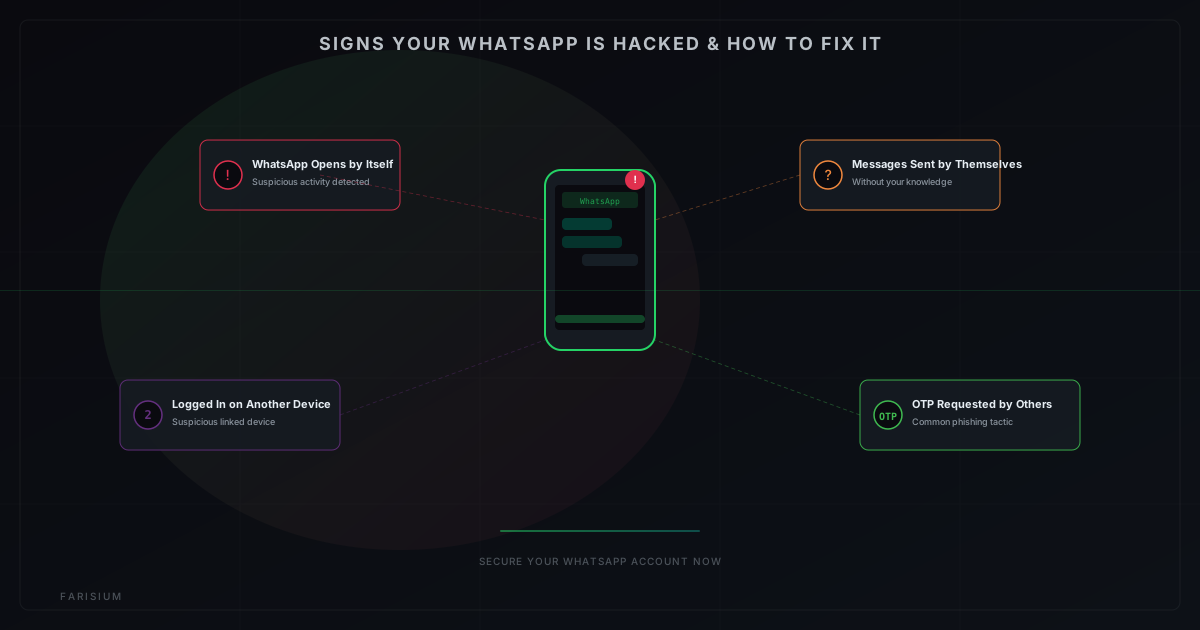
WhatsApp is the most popular instant messaging app with over 2 billion users worldwide. Its massive user base makes it a prime target for hackers. Every day, thousands of WhatsApp accounts are compromised by malicious actors — from identity theft and financial scams to blackmail and extortion. Don't wait until you become a victim. Learn the signs WhatsApp is hacked and how to fix it right now.
This article will thoroughly discuss the telltale signs your WhatsApp has been compromised, how to verify it, step-by-step instructions to secure your account, and prevention tips so it never happens again. All information is based on official guidelines from WhatsApp ↗ and current cybersecurity best practices.
What Does "WhatsApp Hacked" Mean?
A "hacked" WhatsApp account means someone has gained unauthorized access to your WhatsApp without your knowledge. The attacker can read all your messages, send messages on your behalf, and even download your chat backups. There are several methods hackers use:
- Linked Device — The attacker logs into WhatsApp Web or desktop without your permission. This is the most common method since it only requires temporary access to the QR code.
- Social Engineering — The attacker tricks the victim into revealing their OTP code or 2FA PIN, usually by impersonating WhatsApp support or a friend.
- Malware/Spyware — Malicious apps installed on your phone record all WhatsApp activity and send it to the attacker.
- SIM Swapping — The attacker replaces your SIM card at the telecom operator, receiving all your SMS and calls including OTP codes.
Signs Your WhatsApp Is Hacked
Here are the telltale signs that indicate your WhatsApp account has been compromised. If you experience one or more of these, take immediate action:
1. Unfamiliar WhatsApp Activity
Messages sent that you didn't send, chats appearing suddenly, or unusual activity notifications. Also check whether there are messages marked as read that you never opened. This could indicate someone is accessing your account from another device.
2. Suspicious Linked Devices
Open WhatsApp > Settings > Linked Devices. If there's an unrecognized device — especially one in a different location from where you are — this is a major red flag. Linked devices have full access to all your conversations.
3. Messages or Calls You Didn't Make
Friends or family start asking about strange messages allegedly sent from your number. Or there are outgoing calls you never made. If this happens, your account is almost certainly compromised and the attacker is actively using it.
4. Automatic Logout from WhatsApp
If you're suddenly logged out of WhatsApp without reason, someone may have logged in from another device and ended your active session. Or conversely, you can't log in because the session has been taken over by the attacker.
5. Phone Overheating or Rapid Battery Drain
Some spyware runs continuously in the background, consuming battery and causing the phone to overheat. If your phone suddenly heats up without clear reason and the battery drains faster than usual, there may be a malicious app running silently.
6. OTP Request to Someone Else
One of the most common scam tactics is the attacker asking the victim to forward the OTP code received on their phone. If someone — claiming to be support or a friend — asks you to share your OTP code, never provide it. The OTP is the key to your account access.
How to Check If Your WhatsApp Is Hacked
Before panicking, perform these simple checks to verify whether your account has actually been compromised:
- Open WhatsApp > Settings > Linked Devices — check all connected devices. If there's an unknown one, log out immediately.
- Open WhatsApp > Settings > Account > Security — check for recent changes to your phone number or email.
- Check chat archives — sometimes attackers move important conversations to archive to cover their tracks.
- Check if there are suspicious Google Drive or iCloud backups — attackers can enable backups to download all chats.
- Use tools like the WhatsApp Security Check ↗ from WhatsApp's official FAQ for further verification.
How to Fix a Hacked WhatsApp Account
Once you've confirmed your account is compromised, follow these emergency steps in order. The faster you act, the less damage will be done.
Step 1: Log Out from All Devices
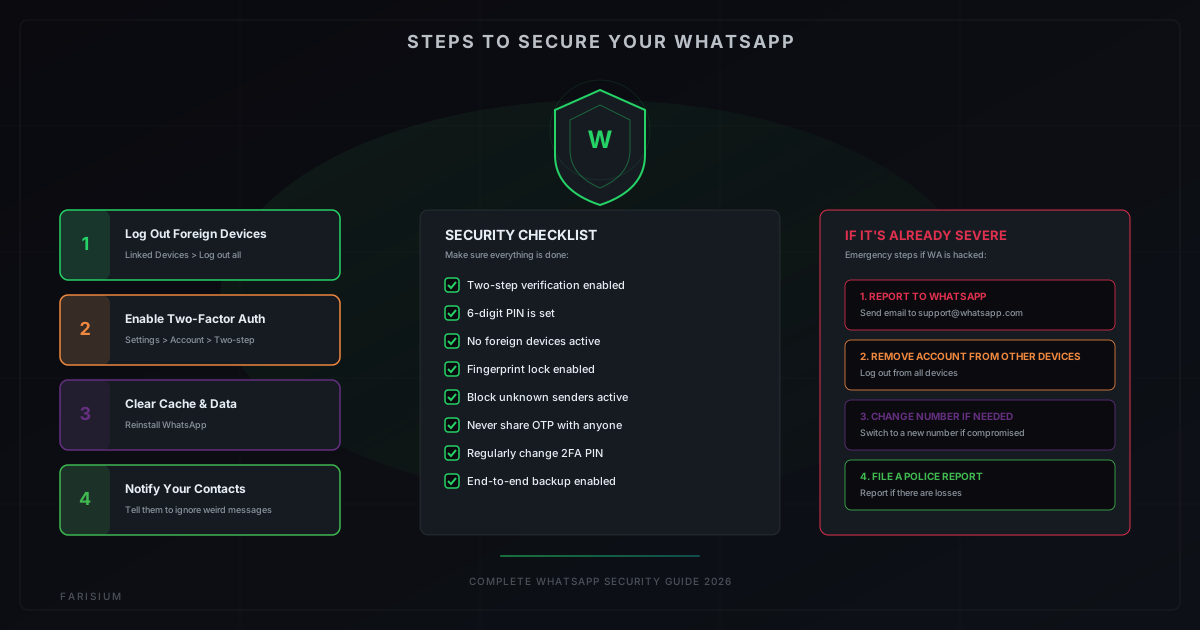
Open WhatsApp > Settings > Linked Devices > select suspicious device > Log Out. This immediately cuts off the attacker's access. Do this without delay.
Step 2: Enable Two-Step Verification (2FA)
Open WhatsApp > Settings > Account > Two-step verification > Enable. Create a 6-digit PIN that's easy to remember but hard for others to guess. This PIN will be required whenever your number is registered on a new device, preventing the attacker from taking over your account.
Step 3: Clear App Cache and Data
In your phone settings, find WhatsApp > Clear Cache > Clear Data. Then uninstall and reinstall WhatsApp. This ensures all residual data from the attacker is wiped. After reinstalling, log in with your number and enter the 2FA PIN you created.
Step 4: Notify Your Contacts
Send a broadcast message to your important contacts that your account was hacked and if they received any suspicious messages before, it wasn't from you. This prevents further fraud being committed in your name.
Step 5: Enable App Lock
Open WhatsApp > Settings > Privacy > Screen lock > Enable. Activate fingerprint or face unlock to open WhatsApp. This adds an extra layer of security so even if your phone isn't locked, WhatsApp stays protected.
Step 6: Change 2FA PIN Regularly
Once the situation is safe, change your 2FA PIN regularly — at least once a month. This makes it harder for attackers to regain access even if they obtain other information.
Prevention Tips to Keep WhatsApp Safe
Prevention is always better than treatment. Here are tips you should implement to keep your WhatsApp secure:
- Never share your OTP code with anyone, including those claiming to be WhatsApp or bank support.
- Enable two-step verification and use a different PIN from your phone or other app PINs.
- Check linked devices regularly — at least once a week.
- Avoid clicking suspicious links from unknown numbers — they could be phishing.
- Don't install apps from unofficial sources (other than Play Store or App Store).
- Enable WhatsApp app lock with fingerprint or face unlock.
- Update WhatsApp to the latest version to get the latest security patches.
- Don't use public WiFi to access WhatsApp without VPN.
FAQ
Can WhatsApp be hacked without phone access?
Yes, via linked devices. If an attacker manages to scan your WhatsApp QR code (for example while your phone is left unattended), they can access messages without touching your phone again. That's why enabling app lock is crucial.
Does WhatsApp's end-to-end encryption not protect against hacking?
WhatsApp's end-to-end encryption protects messages in transit between devices. However, if an attacker has already logged into your account (via a linked device), they receive already-decrypted messages — just like you. So encryption doesn't help if the account itself is compromised.
How can I find out who hacked my WhatsApp?
It's difficult to identify the attacker directly. What you can do is check linked devices for device type and location, then log out. For serious cases, you can report to law enforcement with screenshots of suspicious linked devices as evidence.
Does changing my phone number fix a hacked WhatsApp?
Changing numbers can be a last resort in very severe cases where the attacker still has access even after following all the steps above. However, make sure you enable 2FA on the new number to prevent a similar incident.
How long can an attacker access my WhatsApp?
As long as the linked device session is active, an attacker can access your WhatsApp 24/7 without time limits. Sessions don't automatically expire unless you manually log out or replace the phone. That's why it's critical to act immediately.
Conclusion
Knowing the signs your WhatsApp is hacked and how to fix it is an essential digital security skill every WhatsApp user should have. By recognizing early warning signs and taking appropriate preventive measures, you can protect your account's privacy and security from increasingly sophisticated threats.
Remember, digital security starts with personal awareness. Never underestimate cyber threats just because you think you're "not a target." Cybercriminals don't pick and choose — they exploit negligence. Always maintain your account security, and share this information with family and friends so they stay vigilant too. You can also read What Is Agentic Ransomware to understand the latest AI-powered cyber threats, and Future of AI in Indonesia 2026 for local tech security trends.
Protect Your Digital Security
Explore Farisium AI ToolsPertanyaan Umum
Yes, via linked devices. If an attacker manages to scan your WhatsApp QR code (for example while your phone is left unattended), they can access messages without touching your phone again. That's why enabling app lock is crucial.
WhatsApp's end-to-end encryption protects messages in transit between devices. However, if an attacker has already logged into your account (via a linked device), they receive already-decrypted messages — just like you. So encryption doesn't help if the account itself is compromised.
It's difficult to identify the attacker directly. What you can do is check linked devices for device type and location, then log out. For serious cases, you can report to law enforcement with screenshots of suspicious linked devices as evidence.
Changing numbers can be a last resort in very severe cases where the attacker still has access even after following all the steps above. However, make sure you enable 2FA on the new number to prevent a similar incident.
As long as the linked device session is active, an attacker can access your WhatsApp 24/7 without time limits. Sessions don't automatically expire unless you manually log out or replace the phone. That's why it's critical to act immediately.

M. Faris Deni K.
Founder & Developer of Farisium. Writing about AI, technology, and platform development.