
How to Use AI to Boost Work Productivity in 2026
AI for productivity: 7 practical ways to speed up emails, presentations, research, and design at work — complete with recommended tools for 2026.
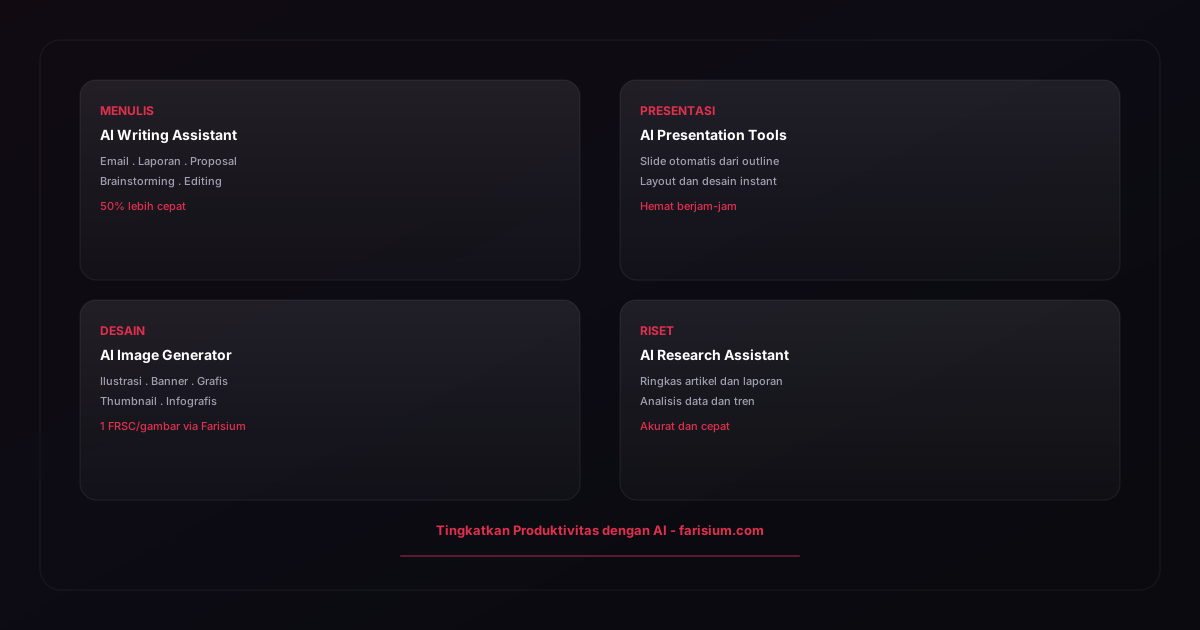
Productivity is a universal challenge. In 2026, artificial intelligence has become the primary solution for working smarter, not harder. From writing emails to creating presentations, AI can save hours every week.
In this article, we explore practical ways to use AI for boosting work productivity — complete with tools you can try right now, including the Farisium AI Tools ecosystem.
Why AI Matters for Work Productivity
Studies show workers spend an average of 30% of their time on repetitive administrative tasks: emails, scheduling, data entry, and document revisions. AI can automate or accelerate most of these tasks, freeing time for work that truly needs creativity and strategic thinking.
AI also helps reduce human error and ensures consistent quality. Modern AI tools are increasingly affordable — many are free or offer freemium models.
AI for Writing and Email Management
Email is one of the biggest time consumers in the workplace. AI writing assistants like ChatGPT and Claude can help you write professional emails in seconds. Just provide context and desired tone, and the AI generates a draft ready for editing.
Tips: use AI to create templates for frequently sent emails, summarize long email threads, and translate emails into other languages. For users who also create visual content, Farisium Anime Generator can produce illustrations to enrich your visual communication.
AI for Presentations and Documents
Creating presentations from scratch takes hours. AI tools like Gamma, Beautiful.ai, and Canva AI can generate complete slide decks from just an outline or topic. AI handles layout, color schemes, and even suggests content for each slide.
For written documents, AI writing assistants help structure reports, proposals, and technical documentation cleanly. You just verify and adjust the output.
AI for Research and Data Analysis
Research is another area where AI shines. AI can summarize long articles, compare information sources, extract data from documents, and help with trend analysis. Tools like Perplexity, Google Gemini, and Claude excel at research and analysis.
- Summarize long articles and reports in seconds.
- Compare information from multiple sources automatically.
- Extract structured data from unstructured documents.
- Generate insights from raw data with AI assistance.
AI for Creativity and Design
Not everyone has design skills, but everyone needs visual content. AI image generators have bridged this gap. With tools like Farisium Anime Generator, you can produce high-quality illustrations from text descriptions — no drawing skills required.
Beyond illustrations, AI can help generate social media graphics, website banners, infographics, and other marketing materials. For content creators, combining AI writing assistants with AI image generators is a powerful workflow for rapid content production.
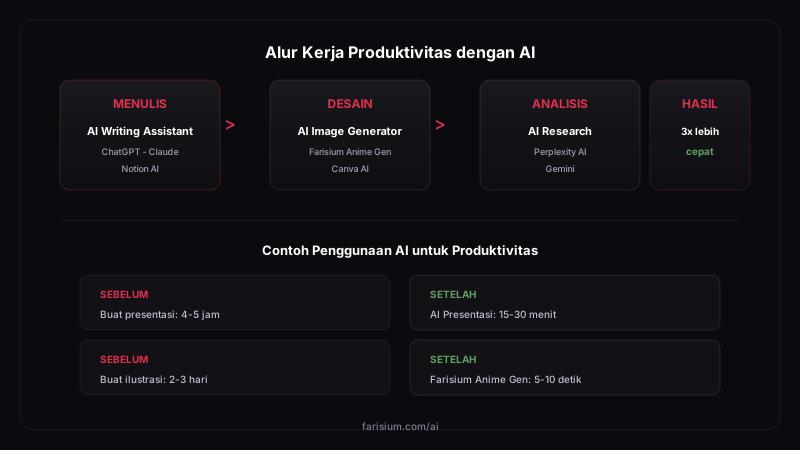
AI Tools You Should Try
Here are our recommended AI tools for boosting productivity, including free and paid options:
- ChatGPT / Claude: AI writing assistant for writing, brainstorming, and analysis.
- Farisium Anime Generator: Generate illustrations and anime-style images for visual content.
- Perplexity AI: Research assistant with verified sources.
- Gamma / Beautiful.ai: Create AI presentations in minutes.
- Notion AI: AI integrated ↗ directly into workspace and documentation.
- Grammarly / LanguageTool: Grammar correction and writing style improvement.
Ethics and Boundaries When Using AI at Work
Productivity should never come at the cost of trust. A few boundaries to hold onto when using AI for work: never paste confidential company data, customer data, or proprietary code into public AI tools without permission — many services use your input to train their models. Check your company policy too; more and more organizations now have explicit rules about which AI tools are allowed.
On attribution: use AI as an assistant, not a ghostwriter. If a report or article will be published under your name, you are fully responsible for its accuracy — including any facts the AI hallucinated. Verify every number, quote, and claim before sending anything out.
Common Mistakes When Adopting AI for Work
- Using AI for everything at once — no single workflow gets properly optimized. Start with the one task that eats the most of your time.
- Providing no context in prompts — generic output comes from generic input. Always include the audience, goal, and desired format.
- Trusting output without verification — AI can be wrong with total confidence. Treat every output as a first draft from a junior assistant.
- Ignoring sensitive data — pasting internal documents into public tools is a serious leak risk.
- Stopping after the first week — the real value of AI only appears after you tune prompts and workflows to your own style over several weeks.
A challenge for this week: pick one routine task you find most tedious — say, writing meeting summaries or follow-up emails — and delegate its first draft to AI for five straight days. Note how many minutes you save each day. That small number is usually enough to convince yourself that expanding to the next task is worth it.
Conclusion
AI has become an indispensable productivity tool in 2026. By adopting AI gradually, you can save time, reduce errors, and focus on work that truly matters.
Start with free tools like ChatGPT ↗ for writing, SEO Caption Generator for SEO-friendly product captions, and Farisium Anime Generator for visuals. Also check out our AI for Content Creators guide for deeper insights into the AI tools ecosystem.
If you work in marketing, check out our guide on AI for Content Marketing covering research, production, and content distribution. Make sure you have enough FRSC by reading our guide on how to get free FRSC.
To learn AI more systematically, check out our list of the Best Online AI Courses 2026 suitable for professionals who want to boost their productivity with structured AI skills training.
Boost your productivity with Farisium AI tools
Explore Farisium AI ToolsFrequently Asked Questions
No. AI is a tool to enhance productivity, not replace humans. Workers who can use AI effectively will have a competitive edge over those who cannot.
Starting from free. ChatGPT's free tier, Farisium Anime Generator with FRSC from Rewards, and Canva's free version are enough to get started. Paid plans start from $10-20 per month for advanced needs.
Start with an AI writing assistant (ChatGPT) for writing tasks, and Farisium Anime Generator for visual needs. Both are free and easy to use.
Yes, most tools allow commercial use. Farisium Anime Generator permits full commercial use for generated images.
Start with one small task: use AI to write an email or create a presentation image. Once comfortable, expand to other tasks. Learn prompt engineering techniques for more accurate results.
Related Articles
What Is Open Source AI? Definition, Platforms, and How to Choose
What is open source AI? A complete guide to how it differs from proprietary AI, popular platforms like TensorFlow and PyTorch, and how to choose wisely.
What Model Does AI Mode on Google Use? Everything You Need to Know
What model does AI mode on Google use? The full answer: Gemini 3 behind AI search, its key features, limitations, and how to access it in 2026.
AI for E-commerce Business: Strategies and Tools 2026
AI e-commerce guide for 2026: boost sales with personalization, chatbots, and supply chain optimization. Complete strategies and tools for online stores.

M. Faris Deni K.
Agentic AI Leader. Writing about AI, technology, and platform development.