
Android 17: New Features, Security Upgrades, and AI’s Growing Role in Chrome
Android 17 focuses on security first: anti-theft protection on by default, stricter PIN attempt limits, on-device AI threat detection, and Gemini coming to Chrome on Android.
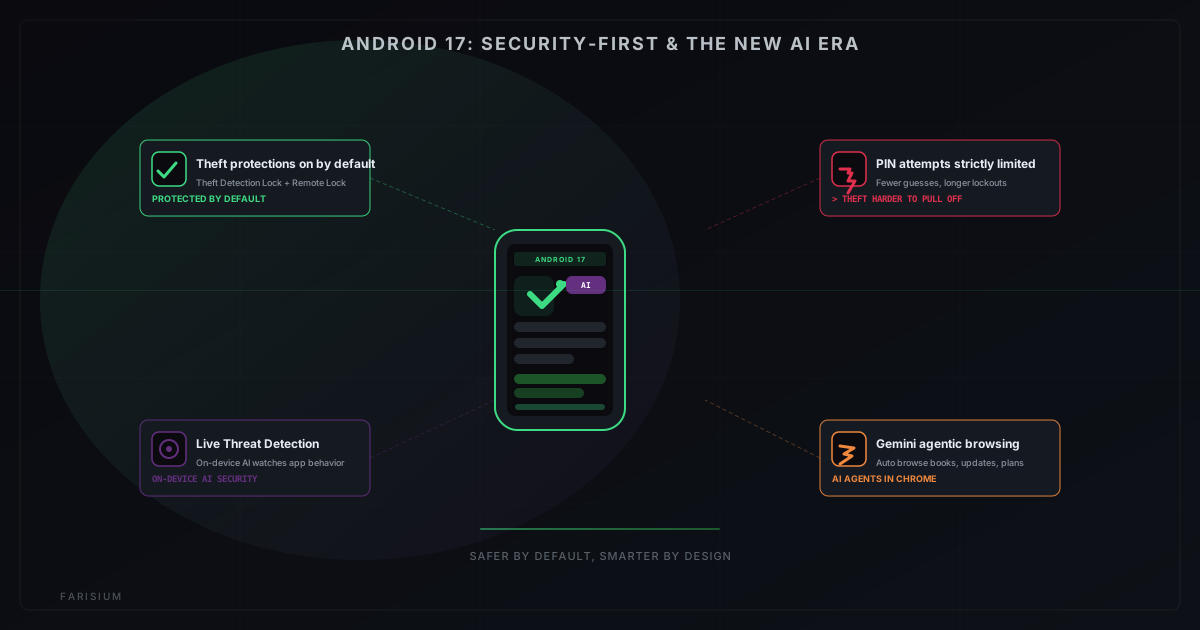
Believe it or not, check the date on your Android phone right now: if the device is supported, there is a good chance the operating system has already — or will very soon — been upgraded to Android 17. Google’s big release brings more compelling changes than just a new look: Android 17 puts security first and starts bringing AI deeper into the operating system, including the Chrome browser you use every day.
For Android users, the question is no longer "when will I get to try it" but "which features are actually useful and which are just gimmicks". This article breaks down the key Android 17 features — theft protection, stricter PIN attempt limits, and deeper Gemini integration in Chrome — along with how each one affects your security and everyday experience.
What Is Android 17?
Android 17 is the latest generation of Google’s mobile operating system, first rolled out to supported Pixel devices in mid-2026, with allocation to other devices following in the second half of the year. Instead of bringing striking visual changes like earlier versions, Android 17 focuses on two strategic areas: strengthening built-in security defenses and deepening the role of AI in the system.
It remains the same single Android ecosystem — not a separate operating system — so every new feature can be enjoyed on the same device alongside the apps you already use. Official information about this release is available on the Android 17 developer release page ↗.
Security Is the Main Focus of Android 17
Android 17 arrives amid rising mobile security threats, especially physical phone theft and malware hiding behind the scenes. Google responds with a different approach: instead of leaving protection to users who must enable it manually, many new security features are now enabled by default.
In its Android security and privacy 2026 announcement ↗, Google describes this policy as ensuring basic protection turns on the moment a device is first used. That means even non-technical users are protected from the start, without having to dig through settings.
Protection When Your Phone Is Stolen
One of the most practical updates in Android 17 is its layered anti-theft system. Phones being snatched directly from the owner’s hands is very common, so these features are highly relevant:
- Theft Detection Lock — enabled by default on new devices, freshly factory-restored devices, or those newly upgraded to Android 17. It detects motion patterns typical of a phone being snatched from the hand and locks the screen automatically so thieves cannot access the phone immediately.
- Remote Lock — can be activated from another device via a phone call or a specific website. You only need to verify your phone number, and the device screen locks within seconds, even before you think about your password.
- Expanded protection — in high-theft-risk countries, anti-theft protection is also opened up to devices running Android 10 and above, not just Android 17 devices.
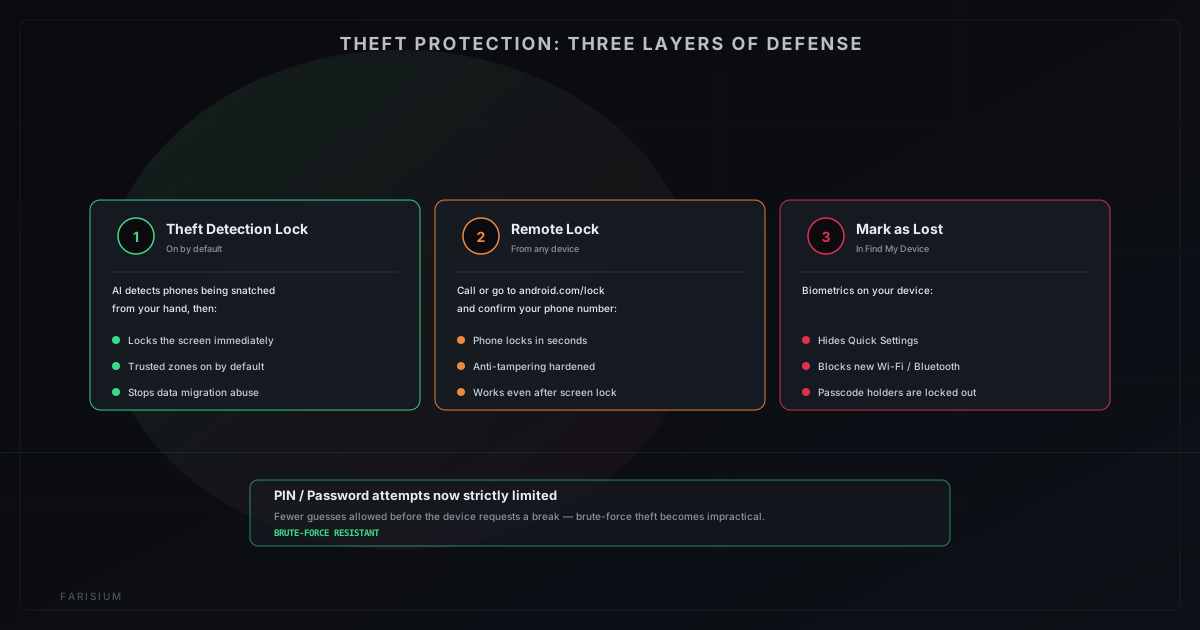
On top of that, the Mark as Lost feature in the Find Hub service brings an important change: when marking a phone as lost, you need to verify with biometrics on the device itself. Once locked, Quick Settings are hidden, new Wi-Fi and Bluetooth connections are blocked, and — most crucially — thieves who even know your PIN or pattern can no longer unlock the device. This closes the old loophole where changing the PIN was not enough to fool a clever thief.
PIN and Password Attempt Limits
Android 17 also tightens the limits on PIN and password attempts. The number of allowed attempts before the device "asks for a time-out" is significantly reduced, and the pauses between failed attempts grow increasingly long.
The effect is felt directly on the most common method used by phone thieves: manual brute-force, repeatedly guessing the PIN until it matches. With much stricter limits, this approach becomes far slower and impractical. One security tip that still applies: choose a PIN longer than six digits when your device supports it, because longer combinations are exponentially harder to guess.
The Growing Role of AI in Android
Android 17 strengthens the security side while also using AI for things that used to require plenty of manual setup. Google calls this capability on-device AI — most of the analysis happens directly on the device rather than on servers, making it faster and more private than sending everything to the cloud.
One example is Live Threat Detection: on-device AI that continuously monitors app behavior to detect suspicious patterns such as automatic SMS forwarding, accessibility overlay abuse, or apps that hide their own icons. The main strength of this approach is behavior-based detection rather than just a list of known malware, so it can catch new threats that have never been catalogued.
On the other side, Chrome on Android now also checks downloaded APK files against known malware before an app can be installed. To better understand how AI works behind the scenes in Google systems, the article on what model AI Mode uses is a great starting point.
Gemini Goes Deeper Into Chrome on Android
The most eye-catching update might come from Chrome: Gemini now merges into the Android browser as a built-in assistant. The rollout to US users began in mid-2026, requiring devices running Android 12 or higher with at least 4 GB of RAM.
- Summarize long articles and answer questions about the web page you are viewing, without switching tabs.
- Connect to other Google apps such as Calendar and Keep within the same conversation.
- Edit or generate images directly in the browser using Nano Banana capabilities.
- Auto browse — an AI agent that can complete multi-step tasks such as booking parking, updating a recurring subscription, or planning a trip itinerary.
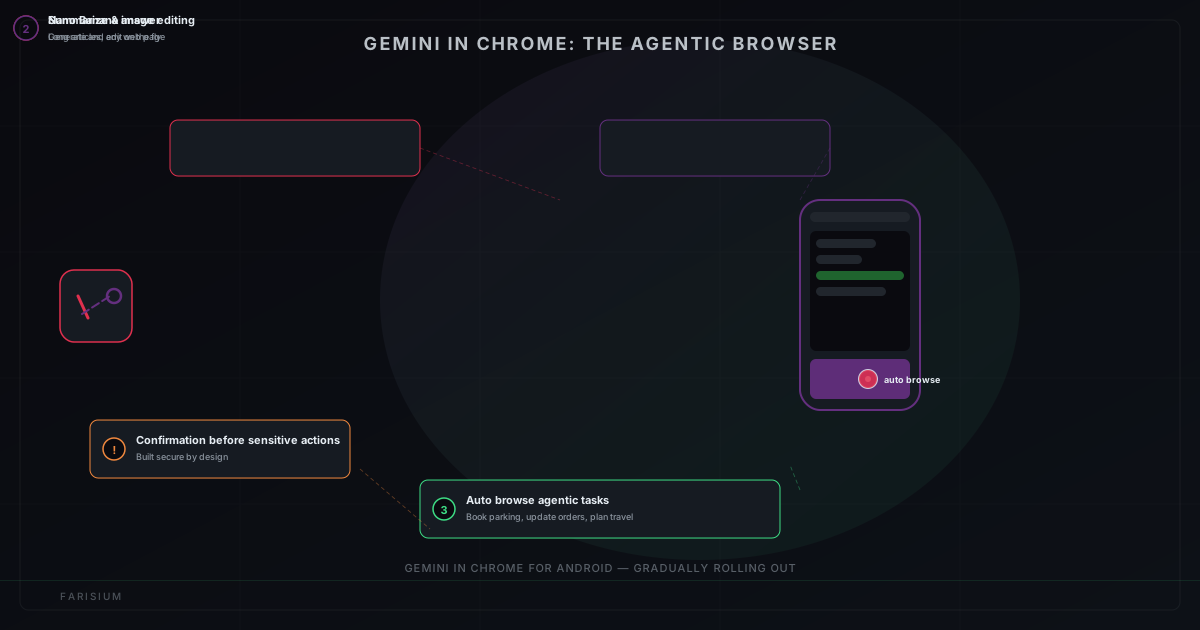
Auto browse is built on the principle of secure by design: models are trained to recognize threats such as prompt injection, and for sensitive tasks like completing a payment, users are always asked for confirmation before execution. You can read the official announcement on the Google blog about Gemini in Chrome on Android ↗.
For users elsewhere, note that the launch starts in the US with English support. But Google’s feature history shows the same pattern: once stable and proven safe, availability usually expands to other regions, as discussed in the outlook on the future of AI in Indonesia.
Will Every Android Phone Receive Android 17?
Not all devices will receive Android 17. Update policy depends on each vendor, and this is a key point that users often misunderstand.
- Supported Pixel devices usually receive the update earlier than other vendors.
- Vendors such as Samsung, Xiaomi, OPPO, and Vivo set their own update schedules per model and region.
- Budget devices and older models often only receive one or two major updates before being dropped.
- Supported devices are the only ones that get official updates, and running unofficial versions poses security risks.
Should You Upgrade Right Away?
It depends. Upgrading the operating system is not a decision that needs to be rushed, but it is also not something you should postpone for too long:
- The new security features are impressive — for users whose phones are often carried to crowded places or used for financial transactions, the protection value is very real.
- Some apps will start targeting Android 17 APIs — apps that are not yet updated may still run, but those leveraging new features are only available after the system is upgraded.
- Before upgrading, make sure storage is sufficient, back up important data, and leave the phone charging overnight so the process is not cut off.
- If your device is supported, run the update through official vendor settings — do not use unofficial APK files that carry security risks.
Best Practices for Users
- Check whether your device is on the supported list for Android 17 — usually visible in the about-device menu or the vendor’s official website.
- Make sure theft protection is active after upgrading; on new devices it is already on by default, but it does not hurt to verify.
- Change your PIN to a longer one and avoid easily guessed patterns like 123456 or your birth year.
- Enable two-step verification for your Google account so thieves cannot recover the account through your device.
- Practice good digital security habits in general, as also covered in the guide on spotting a hacked WhatsApp.
Android 17 Is More About Security Than Looks
If you expected Android 17 to bring a completely new interface design, you might feel a little disappointed — the visual changes are relatively subtle. But that is precisely its strength: Android 17 focuses on what is invisible yet more fundamental, protecting users from real-world threats.
Protection from phone snatching, PIN attempt limits, AI-based threat detection, and a browsing assistant that understands page context — all of this works in the background without disrupting how you use your phone. This aligns with the broader industry direction of shifting AI from a bonus feature to a core part of the operating system.
Conclusion
Android 17 is arguably the most "security-first" release Google has ever made: anti-theft protection on by default, strict PIN limits, and AI that monitors threats directly on the device. With Gemini starting to merge into Chrome, the direction of Android is very clear — devices that are physically secure, and smarter without relying on everything on the server side.
All you need to do now is fairly simple: check device support, prepare a backup, and let the update run through official channels. The more devices used securely, the smaller the loopholes criminals can exploit — and that is a shared benefit for all Android users. While waiting for the update, you can start getting familiar with the ever-closer AI ecosystem, for example by understanding how AI content watermarking works as preparation for consuming digital content every day.
Explore Farisium AI tools and learn how to use AI safely and productively
Explore Farisium AI ToolsRelated Articles
Google’s New Feature Lets You Save an Item’s Location Without a Tracker
Google added a feature to Find Hub that lets you save where you put your passport, spare key, or anything else — no Bluetooth tracker needed. Here’s how it works.
How to Use AI for Research Without Hallucinations: A 7-Step Verification Workflow for 2026
Learn how to use AI for research without blindly trusting its answers. This practical 7-step workflow helps you verify sources, detect hallucinations, fact-check claims, and produce more reliable research.
ChatGPT for Teens: What Parents Need to Know About OpenAI's New Safety Mode
OpenAI launched ChatGPT for Teens on August 18, 2026. Here's how age prediction works, what parental controls actually do (and don't), and the gaps parents should still watch for.

M. Faris Deni K.
Agentic AI Leader. Writing about AI, technology, and platform development.