If your Next.js build on Vercel fails with Error while looking up import map: next/font/google queries have exactly one entry, your font configuration is probably fine. The usual cause is the response Google Fonts sent during that particular build. next/font/google downloads font files at build time, and Google occasionally returns a font URL format that the Next.js font loader cannot parse. The build then fails on a font import that worked yesterday and will likely work again on a later retry.
At Farisium, retrying did not solve this. Removing the dependency did. We downloaded the same woff2 files Google serves, committed them to the repository, and switched from next/font/google to next/font/local. After that change, the build no longer makes any request to Google Fonts, so this failure has nothing to break. The rest of this article covers how to confirm you have the same problem, how to apply the fix, and how to verify it.
Why your build failed when it worked yesterday
With Turbopack, the default bundler in Next.js 16, the error looks like this:
Error while looking up import map: next/font/google queries have exactly one entryThe trace mentions NextFontGoogleFontFileReplacer and a file such as [next]/internal/font/google/<font-name>.module.css, pointing back at app/layout.tsx. If you build with webpack, the same problem shows up as TypeError: Cannot read properties of null (reading '1') in loader.js.
Here is what happens. At build time, next/font/google requests the css2 stylesheet from Google Fonts and then fetches the font files that the stylesheet references. Those URLs normally look like https://fonts.gstatic.com/s/.../*.woff2. Sometimes Google returns a different shape instead: https://fonts.gstatic.com/l/font?kit=...&skey=...&v=v20. That URL has no file extension and contains several & characters.
Turbopack passes the font options to its loader as JSON serialized into an internal query string. The & characters in the /l/font URL split that query string apart, so the loader receives more than one entry and rejects it. Webpack fails for a related reason: its loader identifies font files with the regex /\.(woff|woff2|eot|ttf|otf)$/, and a URL that ends in a query string does not match it.
The font itself is not the problem. The /l/font payload is a valid woff2 file that begins with the wOF2 magic bytes, and the CSS Google returns already declares format('woff2'). Only the URL parsing breaks.
We saw this on 23 November 2026. Vercel deployment dpl_Cua7oaerRS7xKokb845C5QTU4sV4, built from commit a7fdf2d at 11:30, failed on JetBrains Mono with the Turbopack error above. The branch history showed the pattern:
- 9a08a02: READY
- 14e2ee1: ERROR
- a7fdf2d: ERROR
None of those commits touched font code. A clean local build (rm -rf .next && npm run build) passed. A configuration error does not pass locally and fail remotely while the font code stays unchanged, so this was a build-time flake.
How to tell this flake from a configuration error
Before you change anything, check whether your failure matches this pattern. These are the signs:
- The same code sometimes passes. One commit builds, a later one with no relevant changes fails, or a redeploy of the same commit behaves differently.
- No font changes. Nobody touched the next/font/google imports, weights, subsets, or variable names between the passing and failing builds.
- The trace names the font loader. Look for NextFontGoogleFontFileReplacer or a path such as [next]/internal/font/google/<font-name>.module.css.
- The exact error strings appear. On Turbopack: next/font/google queries have exactly one entry. On webpack: Cannot read properties of null (reading '1') in loader.js.
- Local passes while CI or Vercel fails. A clean local build with the .next directory removed completes, but the remote build does not.
If the error appeared right after you edited a font import, start with that edit. A typo in a family name or an unsupported weight is a different problem with a different fix.
Why retrying is not a fix
A redeploy will often go through, and that makes it tempting to treat this as an occasional nuisance. There are three reasons not to.
First, the failure follows a measurable rate. The reporter of GitHub issue vercel/next.js#99114 ↗ sampled Google Fonts responses using Next's User-Agent and found that about 1 in 60 came back in the /l/font?kit= shape. Each font file your build fetches is another chance to get one. If you load several families, you are making several requests per build.
Second, Next's built-in retry() does not catch this case. It covers transport errors and non-200 responses. The /l/font response is HTTP 200 with a valid font in the body, so the build treats it as a success and only fails later, when the loader tries to parse the URL.
Third, upstream status does not guarantee a fix in your version. Issue #99114 was reported on 23 September 2026 and reproduced on Next.js 16.2.12, 16.3.6, and 16.4.0-canary.40. A comment dated 4 October 2026 notes that the candidate pull requests, #99132 and #99308, changed only the webpack loader, not the Turbopack path. sokra closed the issue on 15 October 2026 with the state reason "completed." We were running Next.js 16.2.6 and hit the exact Turbopack error on 23 November 2026, more than a month later. If you plan to upgrade instead of self-hosting, test the specific version you deploy. Do not assume the closed issue covers it.
The fix: self-host fonts with next/font/local
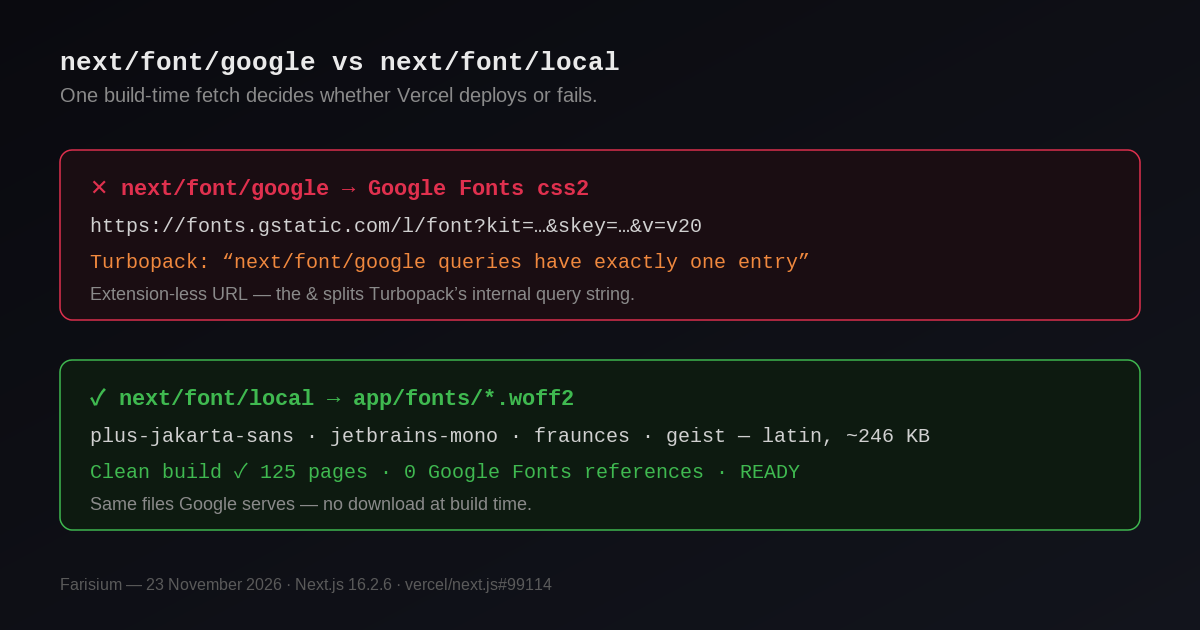
The Next.js font documentation ↗ describes next/font as optimizing fonts and removing external network requests. next/font/local is the version of that module that never contacts Google. You keep the same optimization pipeline and drop the build-time download. We applied the fix in commit b1760b3.
(a) Get the woff2 URLs Google serves. Request the css2 stylesheet for each family, weight range, and style you use. The response contains @font-face rules whose src URLs point to the actual font files. Download those exact files so you ship what you were already serving. If one of them is a /l/font?kit= URL, the payload is still a valid woff2 file and can be saved as one.
(b) Download only the subsets you use. Google splits families into subsets. We needed only latin, so we took only the latin files. With variable fonts, one file covers the whole weight range. Our set ended up as five files totaling about 246 KB:
- Plus Jakarta Sans, weights 300 to 800
- JetBrains Mono, weights 100 to 800
- Fraunces normal, weights 100 to 900
- Fraunces italic, weights 100 to 900 (the opsz optical-size axis stays inside both Fraunces files)
- Geist, weights 100 to 900
(c) Store them in app/fonts/. next/font/local resolves src relative to the file that calls it. With the files in app/fonts/ and the calls in app/layout.tsx, the paths start with ./fonts/.
(d) Replace the imports and keep the same variable names. This step decides whether the change stays invisible to the rest of your code. We kept --font-sans, --font-mono, --font-display, and --font-geist unchanged, so nothing in our CSS or components needed editing. We also kept display: 'swap'. When a family is split across several files, as Fraunces is across normal and italic, src takes an array:
import localFont from 'next/font/local';

const jetbrainsMono = localFont({
  src: [
    { path: './fonts/jetbrains-mono-latin.woff2', weight: '100 800', style: 'normal' },
  ],
  variable: '--font-mono',
  display: 'swap',
});

const fraunces = localFont({
  src: [
    { path: './fonts/fraunces-latin.woff2', weight: '100 900', style: 'normal' },
    { path: './fonts/fraunces-italic-latin.woff2', weight: '100 900', style: 'italic' },
  ],
  variable: '--font-display',
  display: 'swap',
});
The JetBrains Mono path matches our repository. You do not need extra code for Fraunces's optical sizing. Browsers apply it automatically because font-optical-sizing: auto is the default.
How to verify the fix
A passing build alone does not prove the fix. The point of the change is that the build no longer depends on Google, so check for that directly:
- Run a clean build. Run rm -rf .next && npm run build. Ours passed and generated 125 pages.
- Search the built CSS for Google Fonts references. Run something like grep -r "fonts.googleapis.com\|fonts.gstatic.com" .next/static. The output should be empty. Any match means a next/font/google import or a hard-coded stylesheet link is still in the build.
- Check the emitted files. Look in .next/static/media/. You should find one woff2 file for each font file you added. We found all five.
- Deploy a preview before production. Our preview deployment went READY. We then merged to main, the production deployment went READY, and farisium.com returned HTTP 200.
One clean build cannot prove the flake is gone, because the original failure was intermittent anyway. The grep in step 2 is the stronger evidence: if the build makes no request to Google Fonts, Google's response format cannot affect it.
When to keep next/font/google, and when to self-host
Self-hosting has costs. It adds about 246 KB of binary files to the repository in our case. It also adds maintenance: when you add a weight, a style, or a subset, you have to download the files again yourself. With next/font/google, you only edit a config object.
For a small site that deploys rarely, next/font/google is still a reasonable choice. A build that fails occasionally and passes on retry is a minor annoyance if you deploy a few times a month.
The trade-off changes when you deploy often, use several font families, or depend on CI for releases. Each build makes multiple font requests, and each request has a small chance of failing. Across many builds, those failures add up to blocked releases and redeploys. For a publication that ships often, we judged that one-time download work was worth avoiding the repeated failures.
Limitations
- This removes one failure point only. It eliminates the build-time dependency on Google Fonts and the URL-parsing failure described here. It does not address other font issues, such as layout shift, incorrect fallback metrics, or missing glyphs.
- The files will not update themselves. If you change subsets, weights, or styles, download the files again. Code that requests a weight your files do not contain will not fetch it from anywhere.
- This is not a general fix for Next.js build failures. If your error does not match the signs in the checklist above, this change is unlikely to help.
- Our observation is narrow. We hit this error on Next.js 16.2.6 with Turbopack on Vercel. We did not test other Next.js versions, webpack builds, or other hosts ourselves. The details for other versions and the 1-in-60 sampling rate come from the issue reporter, not from our own measurement.