
How to Build a Private AI Knowledge Base for Small Business: A Practical 2026 Guide
Learn how to build a private AI knowledge base for your small business. This practical guide covers document preparation, retrieval, privacy, testing, access control, and maintenance.
Small businesses rarely suffer from a lack of information.
The real problem is usually finding the right information quickly.
Pricing may live in a spreadsheet. Policies may be stored in PDFs. Product details might be scattered across a website, cloud storage, internal notes, and old messages.
A private AI knowledge base can help bring that information together — without asking employees to search manually every time they need an answer. For more ideas, see our guide to AI tools for small business.
But uploading every company document into a chatbot is not enough.
A useful AI knowledge base needs trusted sources, clear permissions, good document structure, and rules for what the AI should do when the answer is uncertain.
What Is a Private AI Knowledge Base?
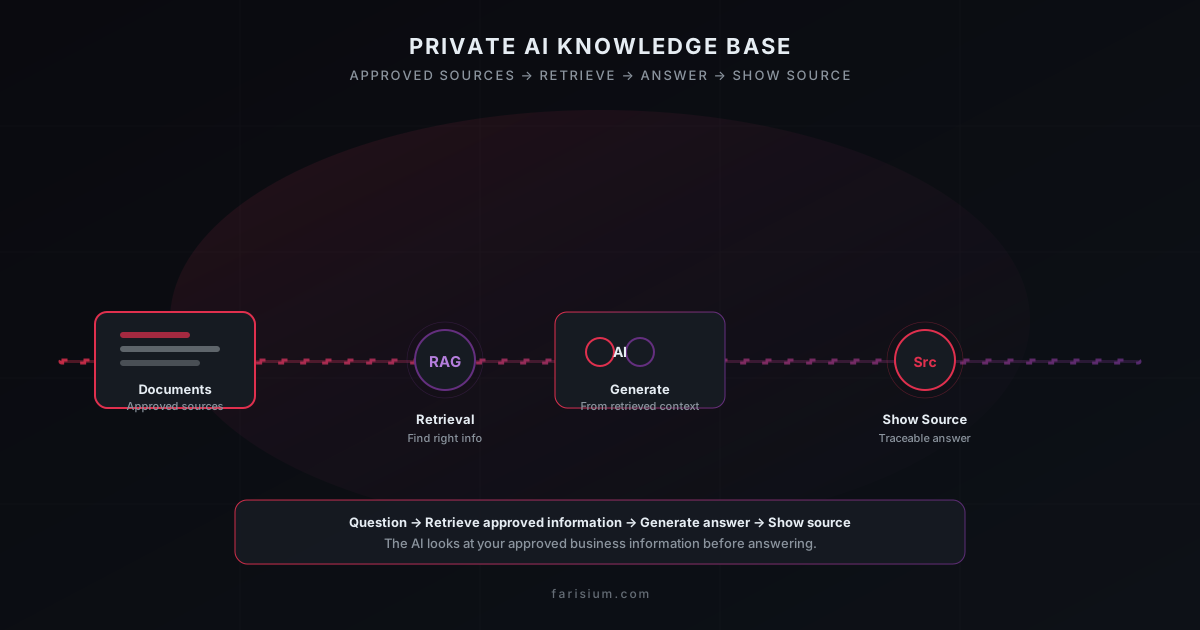
A private AI knowledge base is a collection of approved business information that an AI system can search before answering a question.
That information might include:
- service descriptions;
- pricing rules;
- internal procedures;
- product documentation;
- onboarding guides;
- customer policies;
- FAQs;
- brand guidelines.
Instead of asking an AI: "What is our refund policy?" — and relying on the model’s general knowledge — the system first retrieves your actual refund policy.
The process becomes:
Question → Retrieve approved information → Generate answer → Show source
This approach is commonly associated with retrieval-augmented generation, or RAG.
You do not need to understand every technical detail of RAG to benefit from it.
The key idea is simple: The AI should look at your approved business information before answering questions about your business.
Step 1: Define the AI’s Job
Do not start with: "We want an AI that knows everything about our company."
That scope is too broad.
Start with one practical use case.
For example, a small web agency could build an AI agent that answers questions about:
- packages;
- pricing;
- revisions;
- delivery time;
- domains;
- maintenance;
- payment;
- project requirements.
This is easier to test and maintain as part of a focused AI productivity workflow.
A useful rule
Before adding information, ask:
Does the AI actually need this information to perform its job?
If the assistant handles customer-service questions, it probably does not need payroll records or private employee evaluations.
Start narrow. Expand later.
Step 2: Choose Trusted Sources
An AI system cannot reliably fix contradictory company information.
Suppose one document says:
Package A costs $199.
Another says:
Package A costs $249.
Which one should the AI trust?
Before building the knowledge base, decide which source is authoritative.
For example:
- Pricing: official pricing database or current pricing document
- Refunds: approved refund policy
- Product details: official product database
- Brand guidelines: current brand document
- Support procedures: latest internal support guide
Old versions should either be removed or clearly marked as archived.
Avoid this
Do not keep:
- pricing-final.pdf
- pricing-final-v2.pdf
- pricing-new.pdf
- pricing-REALLY-final.pdf
all active at the same time.
A strong AI model connected to conflicting information can still produce conflicting answers.
Step 3: Clean and Structure Documents
Document quality affects AI quality.
Consider this sentence:
The package includes everything above except where otherwise stated.
A long-time employee may understand it.
An AI system has less context.
A clearer version would be:
The Business Package includes a five-page website, mobile-responsive design, contact form, basic SEO setup, and one revision cycle.
Clear documentation benefits both humans and AI.
Improve documents by removing:
- vague references;
- unexplained abbreviations;
- duplicated sections;
- outdated prices;
- unclear dates;
- contradictory policies.
A good knowledge-base document should be understandable by a new employee without requiring extra explanation.
Step 4: Understand Retrieval
A knowledge-base system usually does not send every document to the AI model.
Instead, it searches for the most relevant information. This grounding step is what retrieval-augmented generation (RAG) ↗ describes.
Suppose someone asks:
Can I change the design after the first draft?
The system might retrieve sections related to:
- revision policy;
- design approval;
- package limits.
Those sections become the context used to generate the answer. You can explore how RAG works in practice ↗ to understand why this matters.
This means two separate things affect quality:
- Retrieval quality — Did the system find the right information?
- Generation quality — Did the AI explain that information correctly?
A powerful model cannot answer correctly if the retrieval system gives it the wrong document.
Step 5: Make the AI Show Its Sources
For business knowledge, source visibility is extremely useful.
Instead of:
Your package includes two revisions.
a better response is:
Your package includes two revision rounds.
Source: Website Builder Service Policy — Revision Terms
This makes answers easier to trust and audit.
Source references also help teams:
- detect outdated documentation;
- identify conflicting policies;
- verify important answers;
- troubleshoot incorrect responses.
Your AI assistant should not behave like an invisible oracle.
It should make important answers traceable.
Step 6: Teach the AI Not to Guess
One of the most important instructions is:
If the approved knowledge base does not contain enough information, say so.
Suppose someone asks:
Can this customer receive a 30% refund?
If the policy does not clearly answer the question, the AI should not invent a decision.
A better response would be:
I cannot determine refund eligibility from the available policy information. This case should be reviewed by the billing team.
That answer is more useful than a confident guess. Learn how to verify AI output without hallucination.
Good escalation cases include:
- unusual refunds;
- legal disputes;
- contract exceptions;
- high-value customer issues;
- security incidents;
- unclear payment situations.
The ability to say "I don’t have enough information" is a feature, not a weakness.
Step 7: Separate Knowledge From Live Data
Some information belongs in documents.
Other information changes constantly.
Good knowledge-base content
- refund policy;
- pricing rules;
- product documentation;
- onboarding guides;
- service descriptions.
Better retrieved from an API or database
- current order status;
- account balance;
- inventory;
- payment status;
- appointment availability;
- delivery tracking.
For example:
What does the Professional Package include?
can come from the knowledge base.
But:
Has invoice WB-123 been paid?
should come from the live order system.
A practical architecture is:
Knowledge base → stable information
API/database → current operational information
This reduces stale answers. Grounding answers in current data is a core part of RAG ↗.
Step 8: Add Access Control
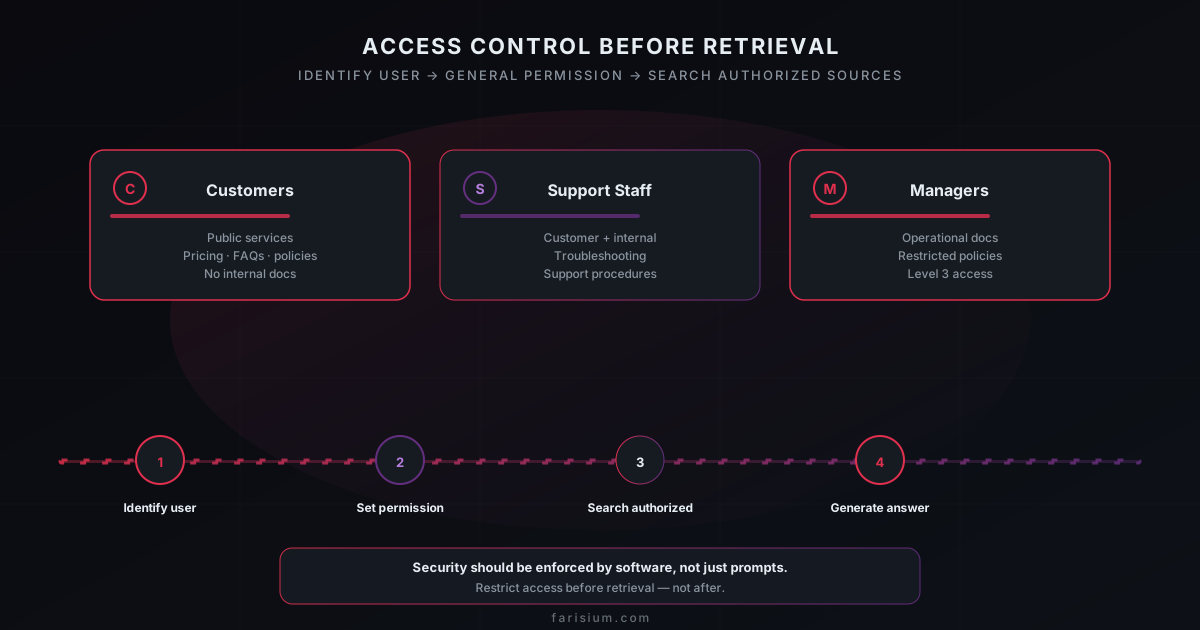
Do not place every document into one large searchable pool.
Different users may require different access.
Customers
Can access:
- public services;
- pricing;
- FAQs;
- basic policies.
Support staff
May also access:
- internal troubleshooting;
- support procedures.
Managers
May have access to:
- operational documentation;
- restricted policies.
The safest sequence is:
Identify user → determine permission → search authorized sources → generate answer
Not:
Search everything → ask the AI not to reveal sensitive information
Security should be enforced by software, not just prompts.
Step 9: Test With Real Questions
Do not test only with perfect questions.
Real users write things like:
client mau revisi lagi, masih include gak?
or:
We changed the homepage twice. Is another revision free?
Both might refer to the same policy.
A useful test set should include:
- simple questions;
- messy questions;
- incomplete questions;
- ambiguous questions;
- questions requiring escalation;
- questions the knowledge base cannot answer.
Evaluate more than the final answer
For each test, check:
- Did the system retrieve the correct source?
- Did the answer accurately represent it?
- Did the AI invent anything?
- Should the question have been escalated?
This is more useful than simply rating a response as "good" or "bad."
Step 10: Maintain the Knowledge Base
A knowledge base becomes unreliable when nobody owns it.
You need a simple maintenance process.
When information changes:
- Update the authoritative source.
- Record the update date.
- Archive outdated versions.
- Re-index the content if required.
- Test several affected questions.
Important documents can also include metadata such as:
- title;
- language;
- version;
- owner;
- last updated;
- status;
- intended audience.
For example:
- Document: Website Builder Pricing
- Version: 4
- Status: Active
- Language: English
- Last Updated: August 2026
Archived documents should normally be excluded from retrieval.
Turn Unknown Questions Into Useful Data
When the AI cannot answer a question, record it.
Suppose customers repeatedly ask:
Can you migrate an existing WordPress website?
but your knowledge base has no answer.
That reveals a documentation gap.
Review unanswered questions regularly.
They can show you:
- missing FAQs;
- unclear services;
- weak documentation;
- repeated customer confusion;
- new opportunities.
In this way, the AI assistant can help improve the knowledge base itself.
Common Mistakes to Avoid
Uploading everything
More documents do not automatically create better answers.
Only add information relevant to the assistant’s purpose.
Keeping outdated files active
Archived information can contaminate answers.
Define one current source for each important topic.
Letting AI make high-risk decisions
Retrieving a refund policy is different from approving a refund.
Start with information retrieval and assistance before adding autonomy.
Using prompts as security
A prompt saying:
Do not reveal confidential information.
is not a substitute for proper permissions.
Restrict access before retrieval.
Mixing live data with stale documents
Do not store constantly changing order statuses inside static PDFs.
Use live systems for live information.
Hiding the source
When important business answers cannot be traced back to an approved source, mistakes are harder to catch.
Source visibility is worth implementing.
Do You Need a Vector Database?
Not necessarily.
A small business with a limited set of documents may be able to use a platform that already provides file search or knowledge-base features. For larger sets, a vector database ↗ can handle similarity search over your documents.
A custom retrieval system becomes more useful when you need:
- many documents;
- custom ranking;
- detailed permissions;
- integration with existing applications;
- multiple data sources;
- advanced analytics;
- control over indexing.
Start with requirements.
Do not start with infrastructure.
The simplest system that solves the problem is often the best first version.
Practical Launch Checklist
Before launching, confirm:
- The AI has one clearly defined purpose.
- Important topics have authoritative sources.
- Old documents are archived or excluded.
- Sensitive data is minimized.
- Access permissions are enforced before retrieval.
- Important answers can show their sources.
- The AI knows when to say it lacks enough information.
- Real user questions have been tested.
- Live data comes from live systems.
- Document ownership is clear.
- Updates have a defined process.
- Unknown questions are reviewed regularly.
If several of these are missing, improve the information architecture before adding more AI features.
Final Thoughts
A good AI knowledge base is not primarily an AI project.
It is an information-quality project.
The system needs to know:
- which information is correct;
- which version is current;
- who can access it;
- where live data comes from;
- and when the AI should stop and ask for human help.
Start small.
Clean the information first.
Make answers traceable.
Separate stable knowledge from live data.
Protect access before retrieval.
Then expand only after the first use case works reliably.
That is how a small business turns AI from a generic chatbot into a genuinely useful business tool.
Explore Farisium AI tools and start building a private knowledge base that actually answers your questions
Explore Farisium AI ToolsFrequently Asked Questions
An AI knowledge base is a collection of approved information that an AI system can search before answering questions. It helps ground responses in business-specific information.
RAG means retrieval-augmented generation. A system retrieves relevant external information first, then gives that context to an AI model to help generate an answer.
Yes. Start with a narrow use case such as customer support, sales information, internal procedures, or product documentation.
Use one authoritative source for each topic, archive old versions, track updates, and test the system after major changes.
Yes, but real-time information is usually better retrieved directly from an API or database rather than stored in static documents.
No. Security depends on access controls, architecture, provider policies, data handling, and operational practices.
Related Articles
How to Fact-Check AI Answers: A Practical 7-Step Workflow for Reliable Research in 2026
Learn how to fact-check AI answers with a practical 7-step workflow. Discover how to verify sources, detect hallucinations, compare evidence, and build more reliable AI research habits.
How to Build an AI Workflow That Actually Saves Time in 2026
Learn how to build an AI workflow that saves time instead of adding more tools. This practical framework helps freelancers and small teams choose tasks, design handoffs, add human review, and measure real productivity gains.
Machine Learning Guide for Beginners 2026
Learn machine learning from scratch. Complete guide covering concepts, types, tools, and practical steps to start your ML journey for beginners.

M. Faris Deni K.
Agentic AI Leader. Writing about AI, technology, and platform development.