
How to Build an AI Workflow That Actually Saves Time in 2026
Learn how to build an AI workflow that saves time instead of adding more tools. This practical framework helps freelancers and small teams choose tasks, design handoffs, add human review, and measure real productivity gains.
AI tools are everywhere. Writing assistants, image generators, meeting summarizers, research tools, AI agents, automation platforms, coding assistants, customer-support bots, and dozens of specialized products promise to make work faster. Yet many freelancers and small teams end up with the opposite result. They add more tools, more tabs, more subscriptions, and more steps — without reducing the amount of work they actually need to do.
The problem is usually not the AI. The problem is the workflow. A useful AI workflow should remove friction from an existing process. It should reduce repetitive decisions, shorten handoffs, and improve consistency without making the user supervise another complicated system. The goal is not "how can I use more AI?" The better question is: "which part of this workflow should no longer require so much human effort?" This guide presents a practical framework for freelancers, small businesses, and lean teams that want to introduce AI without turning their operations into an experiment.
What Is an AI Workflow?
An AI workflow is a repeatable process where AI performs one or more defined tasks inside a larger human or business process. For example, a freelance designer might use this workflow: a client brief arrives, AI extracts the requirements, the designer reviews them, AI generates initial mood-board directions, the designer chooses one direction and creates the final concept, AI helps summarize revisions, and the designer delivers the finished work. AI does not replace the entire project. It accelerates specific parts of it.
A small business could use a similar structure for customer inquiries: a customer message arrives, AI classifies the request, AI drafts a response, a human reviews sensitive cases, and the approved reply is sent. That is different from simply opening an AI chatbot whenever someone remembers to use it. A workflow has a clear trigger, defined inputs, a repeatable sequence, boundaries for AI, human review points, and a measurable outcome. Without those elements, AI often becomes another isolated tool rather than part of an operating system.
Why Many AI Workflows Fail
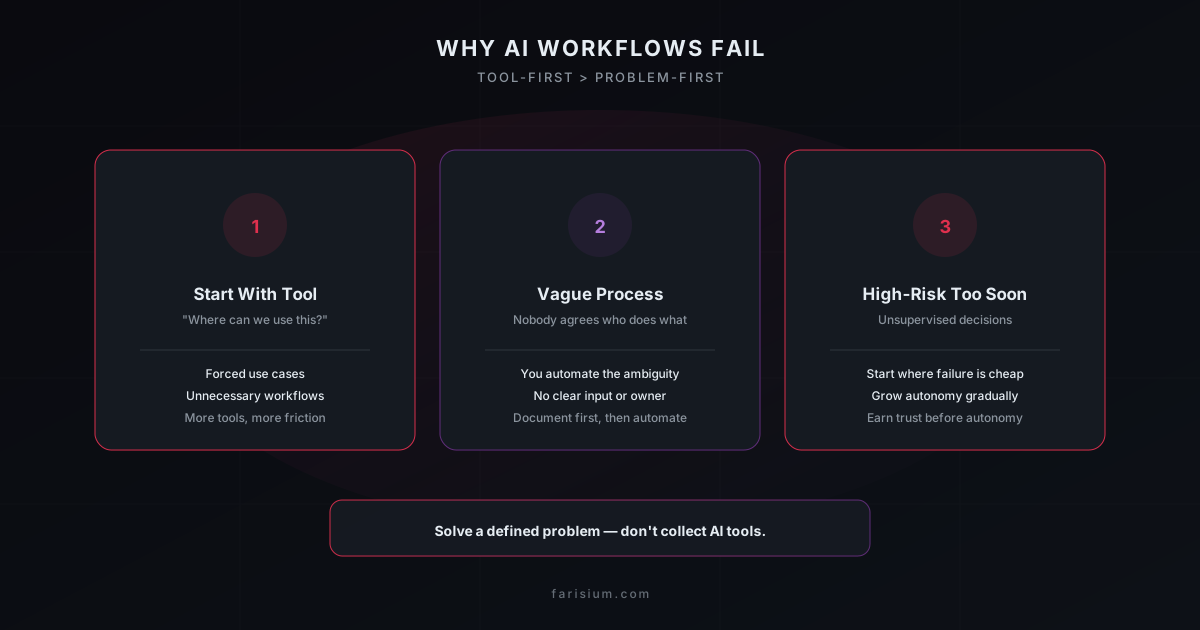
1. Starting With the Tool Instead of the Problem
A new AI product launches and the team asks, "where can we use this?" That sounds reasonable, but it often leads to forced use cases. A better starting point is: "which recurring task is currently slow, repetitive, inconsistent, or expensive?" Then ask whether AI is appropriate. Tool-first thinking creates unnecessary workflows. Problem-first thinking creates useful ones.
2. Automating an Undefined Process
If a human team cannot clearly explain how a process works, automating it usually makes things worse. Imagine a company says it wants AI to automate its content workflow, but nobody agrees on who selects topics, how topics are approved, what sources are acceptable, who checks facts, how brand voice is maintained, or what qualifies as ready to publish. Adding AI will not solve that ambiguity. It will automate the ambiguity. Before introducing AI, write down the current process — even a simple version helps: Input → Decision → Action → Review → Output. Once the process is visible, you can identify where AI belongs.
3. Automating High-Risk Decisions Too Early
AI is especially useful for tasks where mistakes are easy to detect and inexpensive to correct: summarizing notes, categorizing inquiries, drafting outlines, creating first versions, reformatting information, extracting data, and generating alternatives. It is less suitable for unsupervised decisions that can create serious consequences — sending sensitive legal advice, making final hiring decisions, approving large payments, publishing unverified claims, changing production systems automatically, or responding to high-risk customer situations without review. A good AI workflow expands automation gradually. Start where failure is cheap, then add autonomy only when reliability is understood.
The Four-Layer AI Workflow Framework
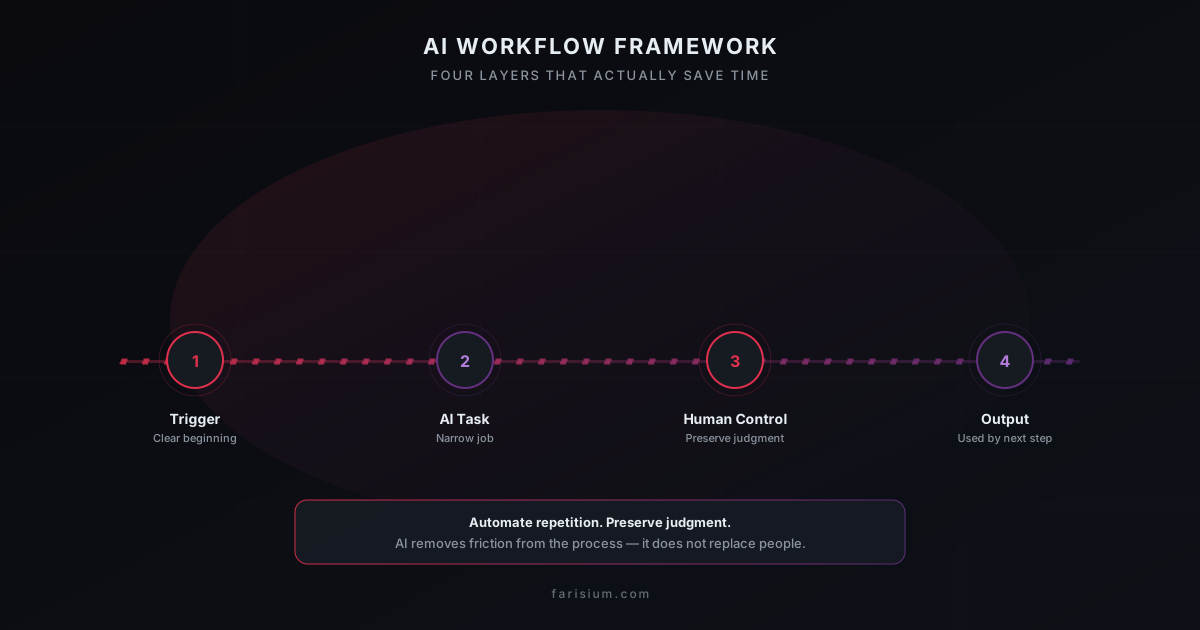
A practical AI workflow can be designed using four layers: Layer 1 is the Trigger, or what starts the workflow. Layer 2 is the AI Task, or what specific work AI should perform. Layer 3 is Human Control, or where judgment is still required. Layer 4 is the Output, or what useful result should exist at the end. Let us examine each layer.
Layer 1: Define the Trigger
Every repeatable workflow needs a clear beginning. Triggers can be manual or automatic: a new customer inquiry arrives, a client submits a form, a meeting ends, a new document is uploaded, an order is created, a support ticket is opened, a freelancer receives a project brief, or someone manually starts a research task. A weak trigger is vague — "use AI when needed." A stronger trigger is specific: "when a completed client brief arrives, extract project requirements into the standard project template." Specific triggers make workflows easier to test and maintain.
Layer 2: Give AI a Narrow Job
One of the biggest mistakes in AI workflow design is asking a single prompt to do everything — read this brief, understand the business, create the strategy, write the copy, plan the campaign, and prepare the proposal. That may work occasionally, but it is difficult to inspect, debug, or improve. Break the job into smaller steps: Step A extracts factual requirements, Step B identifies missing information, Step C generates possible strategic directions, Step D drafts copy based on the selected direction, and Step E reviews the draft against a checklist. This creates multiple advantages. If the output is wrong, you can identify which stage failed, and you can apply different models or rules to different tasks. The best AI workflows are often less impressive to watch than giant one-prompt demonstrations, but they are much easier to trust.
Layer 3: Decide Where Humans Stay in Control
Human review should not be added randomly. It should appear where judgment has the highest value. A useful rule is: automate repetition, preserve judgment. For example, AI can help process a customer support request. It may safely identify the topic, summarize the message, retrieve relevant documentation, and draft a reply. A human may still need to approve refunds, account disputes, legal complaints, high-value customers, or unusual cases. The workflow might be: support request arrives, AI classifies it; if it is a low-risk question, draft a response for quick review and send; if it is not, escalate to a human. This is often better than either extreme — everything manual or everything autonomous.
Layer 4: Define the Output
An AI workflow is useful only if it produces something that helps the next step happen. Useful outputs include a structured client brief, an approved email draft, a prioritized task list, a summarized meeting with action items, a categorized lead, a research memo, a product description ready for review, or a support response draft. Avoid outputs such as "AI generated some ideas" — that is not a workflow outcome. A better output is "five campaign ideas ranked by business fit, each with an audience, hook, CTA, and risk note." Clear outputs make performance measurable.
How to Choose the Right Task to Automate
Not every task deserves automation. A simple scoring model can help. Rate each recurring task from 1 to 5 on four dimensions: frequency (how often it happens), repetition (how similar it is each time), time cost (how much time it consumes), and error tolerance (how easy it is to identify and fix mistakes). A task that scores high across these dimensions is usually a strong AI candidate. For example, summarizing meetings scores high, while final legal approval scores low on error tolerance. Likewise, drafting product descriptions is a strong candidate, while choosing company strategy is not a good place to start with full automation.
A Practical AI Workflow for Freelancers
Freelancers often perform many different roles — sales, project management, creative work, communication, invoicing, research, revisions, and delivery — which makes workflow design especially valuable. Consider a freelance designer receiving a new client project. Without AI, the process may look like: read a long client message, copy details into notes, ask follow-up questions, create a project outline, research competitors, brainstorm directions, prepare a client presentation, receive revision notes, reorganize revision requests, and deliver. Several of those steps can be accelerated.
With AI, the client intake extracts objective, audience, deliverables, deadline, visual preferences, references, and missing information; then the human reviews the summary. AI helps create a competitor-research checklist while the human verifies relevant sources. AI generates possible creative directions and the designer decides which are useful. For revision processing, AI transforms a messy message into requested changes, optional suggestions, questions, and priorities, and the designer checks the interpretation before editing. The AI did not replace the designer. It reduced administrative friction around the creative work — and that is a good automation target. If you are new to bringing AI into a design practice, the guide to AI for freelance designers covers this in more depth.
A Practical AI Workflow for Small Businesses
Small businesses frequently have repetitive communication tasks but limited staff. Consider customer inquiries. The trigger is a customer sending a question through a contact form. The AI task classifies the inquiry as pricing, order status, product question, complaint, partnership, or other. The system retrieves relevant business information for the model, then AI prepares a response. A human rule applies: if the category is pricing or basic information, do a quick review; if it is a complaint, refund, or unusual request, handle it manually. The output is a response ready for approval. This workflow improves speed without giving AI unlimited authority. For a more detailed walkthrough of AI routines in a small business, see AI for content marketing and the companion pieces in the blog.
A Practical AI Workflow for Content Creation
Content is one of the most common AI use cases — and one of the easiest to misuse. A low-quality workflow is: keyword → AI writes article → publish. A better workflow is: search intent, topic selection, research questions, source gathering, AI-assisted outline, human editorial angle, draft, fact verification, original examples, editing, and publish. The AI helps at multiple stages, but the process still includes research and editorial review. This is the difference between using AI as a writing shortcut and using it as part of a publishing system.
Do Not Automate Bad Inputs
An AI workflow is heavily influenced by the quality of its input. Suppose you ask AI to write an email based on "client wants marketing help." The output will probably be generic. Now compare structured input: client is a local coffee shop, goal is to increase weekday orders, audience is office workers within 3 km, offer is a lunch bundle, primary channel is Instagram, tone is friendly and local, and the constraint is no discount above 15%. With that context, AI can create something genuinely useful. This suggests an important design principle: improve the input before improving the prompt. Forms, templates, structured fields, and clear instructions often improve AI outputs more than complicated prompt engineering.
Use AI to Transform Information, Not Invent Missing Information
One of the safest workflow patterns is transformation. Examples include turning unstructured notes into a structured action list, a long document into an executive summary, technical developer notes into a customer-friendly explanation, research notes into a comparison table, and a lead list into a ranked set of opportunities. Transformation tasks have a useful property: the source material exists, which gives humans something to compare the AI output against. Generation from nothing carries more uncertainty.
Add a Verification Step to Every Important Workflow
If AI produces factual information, add a verification layer. For research, that means: AI research draft, extract factual claims, check sources, remove unsupported claims, and publish. For customer communication: AI reply, check the customer name, check product or order data, check policy, then send. For coding: AI-generated code, lint, type-check, test, human review, and deploy. Verification should be part of the workflow architecture, not an optional activity someone remembers after a mistake.
Build Fail-Safe Behavior
What happens when the AI fails? A good workflow should have an answer. If AI cannot classify the inquiry, route it to "needs human review." If AI produces an empty response, do not send anything. If confidence is low, escalate. If a required source is unavailable, label the result incomplete. If an automation API fails, preserve the original input and retry safely. The worst workflow assumes AI will always behave correctly. The best workflow expects failure and contains it.
Avoid Silent Automation
Users should know when important actions happen. Instead of "AI automatically sends customer email," consider "AI prepares a reply, a human approves, then the email sends." Once the process becomes stable, some low-risk responses may move to automatic sending. This gradual approach allows teams to learn where failures actually occur. AI workflows should earn autonomy, not receive it by default.
How to Measure Whether an AI Workflow Is Actually Better
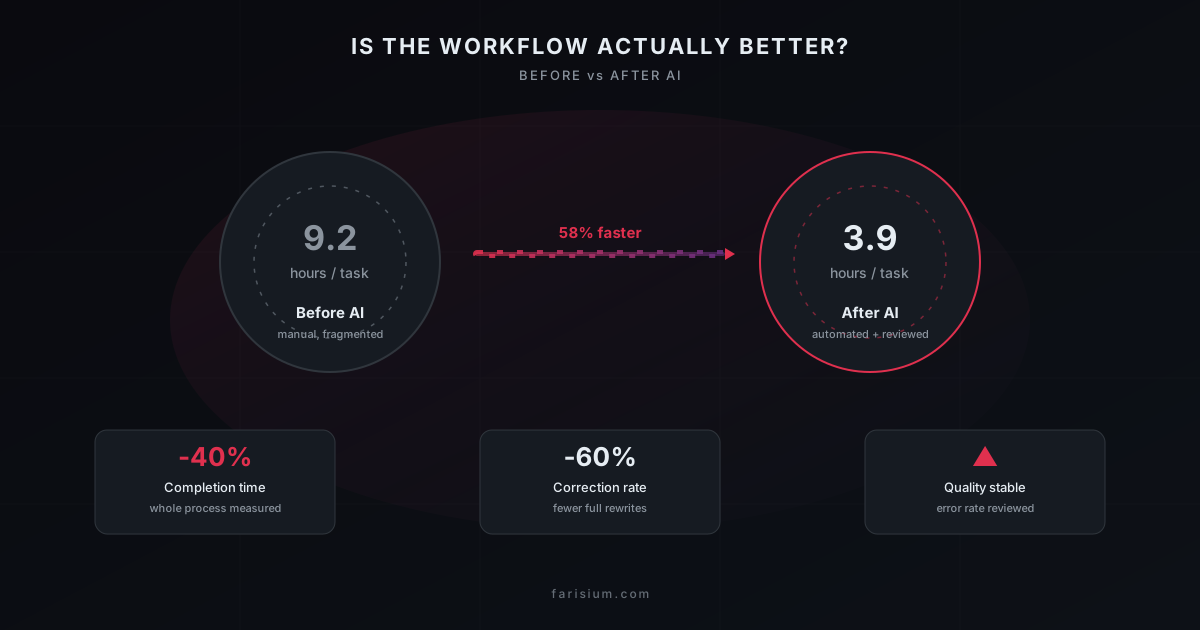
A workflow is not successful because it uses AI. It is successful because the underlying work improves. Track outcomes such as time saved (did the process become faster compared to before AI for the same task), correction rate (how often a human needs to substantially rewrite the AI output), completion time (how long the entire process takes, including any review overhead), error rate (did quality decline), and cost per completed task (subscriptions, API costs, automation platforms, human review, engineering, and maintenance compared with the value created).
The Hidden Cost of Too Many AI Tools
Tool accumulation is becoming a real productivity problem. A freelancer might use one AI for writing, another for research, another for images, another for meetings, another for automation, another for coding, and another for task management. Each tool may be good individually, but every tool also creates another login, another interface, another subscription, another place where context is stored, another privacy decision, and another workflow to maintain. This is why the best AI stack is not necessarily the largest. A useful rule: add a tool only when it removes more complexity than it creates. If two tools perform similar work, standardization may provide more value than another feature. Platforms like Zapier ↗ and Make ↗ are useful exactly because they let you connect existing systems instead of adding yet another isolated tool.
Build Around Stable Tasks, Not AI Hype
AI products change quickly, so workflows should be designed around tasks rather than brand names. Instead of designing "our ChatGPT workflow," design "our customer-inquiry classification workflow," so the underlying model can change later. Likewise, "our Claude research process" is less durable than "our research summarization and verification process." This makes the workflow portable. If a better model becomes available, the business does not need to redesign its entire process. Providers such as OpenAI ↗ and Anthropic ↗ release new models regularly — the task, not the brand, is what should stay stable.
Keep Sensitive Data Out of Unnecessary AI Steps
Before sending information into any AI system, ask: does the model actually need this data? Avoid unnecessary exposure of passwords, private API keys, authentication tokens, confidential client information, financial credentials, private personal data, and internal secrets. If a workflow only needs the project objective, do not send the entire client database. Data minimization improves both security and workflow clarity.
Design Prompts as Interfaces
A production workflow should not rely on vague conversational prompts. Treat prompts like interfaces. A useful prompt defines its role (what the AI is doing), input (what information it will receive), task (what transformation should happen), rules (what must not happen), and output format (what structure is required). For example: "You are assisting with customer inquiry triage. Classify the incoming message as one of: Pricing, Order Status, Product Question, Complaint, Partnership, Other. Do not answer the customer. Return JSON containing category, summary, urgency, and requiresHumanReview." That is far easier to integrate than "help me with this customer."
Structured Outputs Make Automation More Reliable
AI-generated prose is useful for humans, but automation often needs structured data. Instead of "this appears to be a moderately urgent complaint about delivery," use JSON such as category: complaint, urgency: medium, topic: delivery, and requiresHumanReview: true. Structured output makes it easier for software to decide what happens next and reduces ambiguity. For business workflows, this can be more valuable than improving writing style.
The Human Review Ladder
Not every workflow needs the same level of review. You can use a four-level model. Level 1 — AI suggests: AI provides ideas and a human does everything else; this is best for strategy, creative direction, and important decisions. Level 2 — AI drafts: AI creates a first version and a human reviews and approves; this is best for emails, articles, proposals, and summaries. Level 3 — AI acts within rules: AI performs low-risk actions automatically and escalates exceptions; this is best for classification, tagging, data extraction, and routine notifications. Level 4 — AI operates autonomously without normal review; this should be reserved for highly predictable tasks, clear boundaries, low-cost failures, and strong monitoring. Most small businesses do not need Level 4 for everything — often Level 2 or Level 3 delivers most of the benefit with much lower risk.
How to Build Your First AI Workflow in One Hour
You do not need a complex automation platform to begin. Minute 0–10: choose one repetitive task you do several times per week, like summarizing inquiries, turning notes into tasks, preparing client briefs, writing product descriptions, analyzing feedback, or preparing social captions. Minute 10–20: write the current process and document what happens today. Minute 20–30: choose one AI step instead of automating everything. Minute 30–40: define the output — specify exactly what you want, such as project objective, target audience, deliverables, deadline, references, missing information, and questions for the client. Minute 40–50: test three real examples — one normal case, one messy case, and one unusual case — and see where the workflow fails. Minute 50–60: decide whether it saves time. If yes, keep it. If not, simplify it. Do not continue building automation just because you already invested time; that discipline is important.
Example: From Email Inquiry to Qualified Lead
Here is a complete workflow example. Trigger: a new inquiry arrives. Step 1, AI extraction: extract company, service requested, budget if available, deadline, and business problem. Step 2, classification: classify as qualified, needs information, or irrelevant. Step 3, draft: for qualified inquiries, draft a personalized acknowledgment. Step 4, human review: a salesperson reviews the message. Step 5, CRM entry: structured fields are saved. Step 6, follow-up: a human schedules the next step. Notice what AI did not do. It did not independently promise pricing, it did not negotiate, and it did not make the final qualification decision without rules. Automation removed administration while preserving business judgment.
Example: AI Workflow for a Small Online Store
A small online shop could use AI for product publishing. Input is supplier or product information. AI transforms it into a short product title, customer-friendly description, key features, FAQ draft, and social caption. The human verifies price, dimensions, ingredients or materials, warranty, and availability. The output is an approved product listing. This workflow saves time because AI handles formatting and language while humans verify business-critical facts.
Example: AI Workflow for Meeting Follow-Up
Meetings create hidden administrative work. A simple workflow: meeting transcript, AI summary, extract decisions, action items, owners, deadlines, and unresolved questions, human checks, then send the team recap. The workflow does not need an autonomous AI agent — a reliable summarization step may already deliver most of the value. For a broader look at applying AI to regular daily work, the guide to using AI for work productivity is a useful next read.
When an AI Agent Is Actually Useful
AI agents can perform multi-step tasks with tools. They become useful when a workflow includes repeated decision-making, multiple systems, clear rules, and meaningful time savings from autonomous execution. For example, a support ticket flow that identifies the customer, retrieves the relevant order, checks delivery status, drafts a response, and escalates if unusual may benefit from an agent. But if the entire task is "summarize this PDF," you probably do not need an agent. Use the simplest technology capable of completing the task — complexity is a cost. For a set of practical recommendations, see the best AI agents for work automation article.
Signs Your AI Workflow Is Overengineered
Watch for these warning signs. You need to explain the automation for 20 minutes — the process may be too complicated. Every failure requires a developer — the workflow may not be maintainable for a small team. AI passes output through five other AI tools — ask whether those steps actually add value. Nobody knows which system contains the correct data — you have created fragmentation. Humans manually fix nearly every output — the workflow is not yet ready for that level of automation. The automation saves less time than maintaining it — stop. A good AI workflow should eventually feel boring. Reliable systems are often less exciting than demos.
A Better Rule: Automate the Boring Middle
Many valuable workflows have three stages: human judgment, repetitive processing, and human judgment. AI often fits best in the middle. For example: a human chooses the campaign goal, AI generates and organizes variations, and the human selects the final campaign. Or: a human defines the research question, AI organizes source material, and the human evaluates the conclusion. This pattern preserves control while removing repetitive cognitive work.
AI Workflow Checklist
Before launching an AI workflow, ask these questions. Problem: what specific problem does this solve, how often does it happen, and how much time does it currently consume? Input: is the input structured enough, does AI receive only the data it needs, and is sensitive information minimized? AI role: is the AI task narrow and clear, are instructions explicit, and is the output format defined? Human control: where is review required, which cases should automatically escalate, and who owns the final decision? Reliability: what happens if AI returns an incorrect result, what happens if the API fails, and can the original data be recovered? Measurement: how will you know it saves time, are corrections becoming less frequent, and is overall quality improving? Maintenance: who maintains the workflow, what happens if an AI provider changes, and is the process tied unnecessarily to one tool? If these questions do not have good answers, the workflow probably needs more design before more automation.
Final Thoughts
AI can make work faster. But simply adding AI to a business does not create productivity. A strong workflow requires discipline: start with the problem, define the process, give AI a narrow responsibility, keep humans where judgment matters, design for failure, measure the outcome, and then expand automation only when the workflow earns your trust. For freelancers and small teams, this approach has another advantage: you do not need a large AI stack to benefit. One well-designed workflow that removes a recurring hour of repetitive work can be more valuable than ten subscriptions that only generate more output. The goal is not to build the most automated business. The goal is to build a business where people spend less time on repetitive work and more time on the decisions, relationships, and creative work that actually matter.
Explore Farisium AI tools and start building a workflow that saves real time
Explore Farisium AI ToolsFrequently Asked Questions
An AI workflow is a repeatable process where AI performs specific tasks inside a larger human or business process. It typically includes a trigger, defined inputs, AI processing, review rules, and a useful output.
Small businesses can use AI workflows for tasks such as summarizing inquiries, drafting customer responses, organizing leads, preparing marketing content, categorizing feedback, processing documents, and creating internal summaries.
Start with a frequent, repetitive, time-consuming task where mistakes are easy to detect and correct. Avoid starting with high-risk decisions or processes that are not clearly defined.
Measure the complete process before and after implementation. Track completion time, correction rate, error rate, and the amount of human effort still required.
AI workflows are often more effective when designed around tasks rather than entire jobs. They can automate repetitive work while leaving judgment, relationships, creativity, and high-impact decisions to people.
A common mistake is starting with an AI tool instead of a clearly defined business problem. Another is automating an unclear process before documenting how the work should actually be done.
It can be appropriate for low-risk situations when strong rules, reliable business data, and escalation paths exist. Sensitive complaints, refunds, legal issues, or unusual situations should generally receive human review.
Related Articles
How to Fact-Check AI Answers: A Practical 7-Step Workflow for Reliable Research in 2026
Learn how to fact-check AI answers with a practical 7-step workflow. Discover how to verify sources, detect hallucinations, compare evidence, and build more reliable AI research habits.
How to Build a Private AI Knowledge Base for Small Business: A Practical 2026 Guide
Learn how to build a private AI knowledge base for your small business. This practical guide covers document preparation, retrieval, privacy, testing, access control, and maintenance.
Machine Learning Guide for Beginners 2026
Learn machine learning from scratch. Complete guide covering concepts, types, tools, and practical steps to start your ML journey for beginners.

M. Faris Deni K.
Agentic AI Leader. Writing about AI, technology, and platform development.