
AI for Freelance Designers: A Workflow From Brief to Revision
AI for freelance designers: learn how to use it at every stage of a project, from parsing client briefs and moodboard research to drafting concepts, communication, and stress-free revisions.
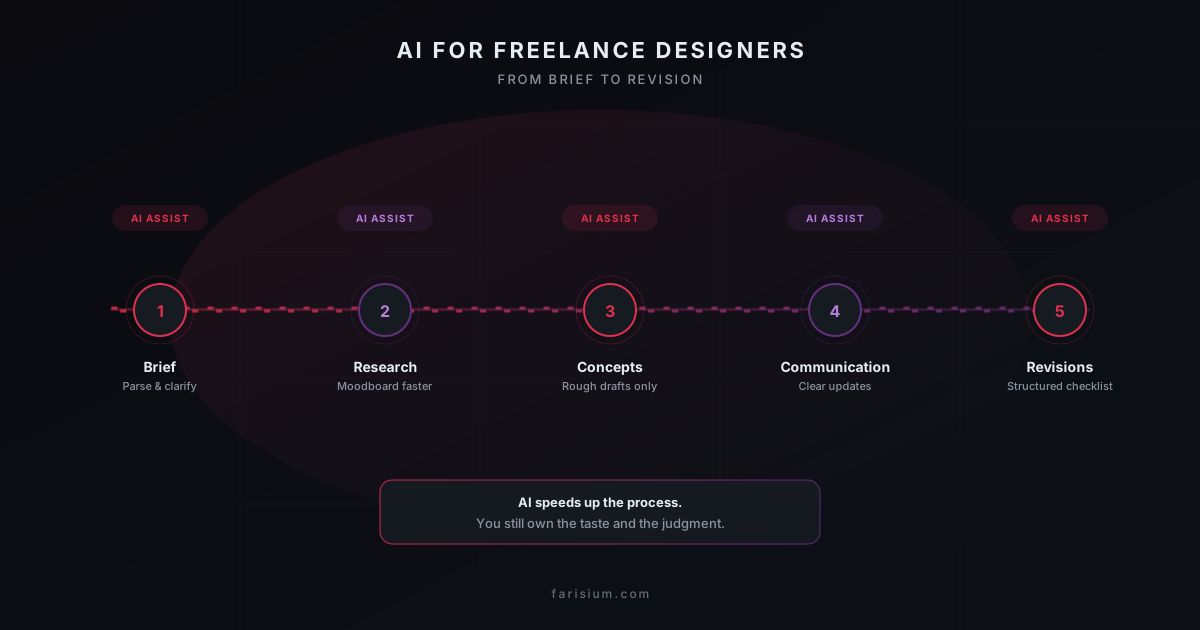
Client briefs are rarely complete. Sometimes it's one paragraph plus a Pinterest link with ten different styles mixed together. That's usually where most of a freelance designer's time actually goes — not into designing, but into guessing what the client really wants. And that's before the revisions start looping without a clear end point.
AI can't replace your taste or judgment as a designer. But used in the right spots, it can cut down the parts of the workflow that eat the most time: making sense of a messy brief, researching references, writing client updates, and turning scattered revision feedback into something actionable. This piece walks through exactly where AI fits into that process, stage by stage.
Why Freelance Design Workflows Need AI’s Help
The two things that stress out design freelancers the most usually aren't about drawing skill or layout — they're about communication: an ambiguous brief at the start, and revisions that never seem to have a clear endpoint. Both come down to how information flows between you and the client, which is exactly where a language model helps more than an image generator does.
The freelance market is also more competitive now. Clients increasingly compare turnaround time, not just price. Designers who respond to briefs faster, show visual direction earlier, and close out revisions without days of back-and-forth tend to win the work — not because the final output is necessarily better, but because the process feels calmer for the client.
Stage 1 — Making Sense of a Messy Brief
First move once a brief lands: don't open Figma or Illustrator yet. Paste the raw brief into ChatGPT or Claude and ask it to split it into three parts — what's explicitly requested, what assumptions need confirming, and which clarifying questions you should send back before starting. This usually surfaces gaps in the brief that would otherwise only show up after the third round of revisions.
- Ask the AI to turn the brief into a deliverables list with rough time estimates for each item.
- Ask it to draft 5-8 clarifying questions based on the vaguest parts of the brief.
- Ask it to summarize the client's brand tone from old material they've sent, like website copy, social posts, or old decks.
You still decide which questions are actually worth sending. At this stage, AI works as a second pair of eyes that doesn't get tired reading a long brief — not a replacement for your judgment on which project is worth taking in the first place.
Stage 2 — Faster Reference Research and Visual Direction
Moodboarding is often one of the most time-consuming stages — hours of scrolling Pinterest or Behance before landing on the right direction. AI speeds up that early exploration: ask a writing assistant to summarize visual trends in the client's niche, or use an AI image generator to quickly visualize three or four different style directions before you start sketching by hand.
This isn't about handing the creative process to a machine. Treat AI output here as a rough starting point — internal discussion material, or even something to show the client early to align on visual direction before you invest full effort executing one concept. If you're not used to writing prompts that actually produce relevant references, it's worth learning some prompt engineering basics first so the results don't come out generic.
Stage 3 — Rough Concepts, Not Final Files
Set a clear boundary at the concept stage: use AI to speed up shape and layout exploration, not to produce a final file you send straight to the client. Generate a few rough layout or illustration variations, then pick one and rework it manually to match the client's actual brand guidelines — colors, typography, and details generic AI usually doesn't get quite right.
This also lowers a real risk: a lot of AI image generators are trained on data with unclear licensing, so raw AI output can be legally shaky if used commercially without being reworked. Treat AI as a fast sketching tool, not a source of final assets — you're still the one finishing the piece by hand, in your regular design software.
Stage 4 — Client Communication That Doesn't Drain You
A lot of designers are strong visually but struggle writing clear project updates. A writing assistant helps here: ask it to draft a project status email, explain a design decision in plain language for a non-designer client, or turn a few rough bullet points you typed quickly into a proper proposal.
- Draft a weekly client update from a few lines of progress notes.
- Turn a technical design rationale into something a non-designer client can follow.
- Put together a professional-sounding invoice or proposal from short bullet points.
One small trick that's genuinely useful: ask the AI to write in a specific tone — "friendly but firm" for pushing back on scope creep, or "formal" for a corporate client. Then edit it lightly so it actually sounds like you, not a generic template.
Stage 5 — Handling Revisions Without Losing Direction
Revisions are usually the most stressful part, especially when client feedback arrives messy — a long WhatsApp message, scribbles on a PDF, a five-minute voice note. Paste all of it into AI and ask for a structured, prioritized revision checklist. That turns confusing feedback into a clear to-do list.
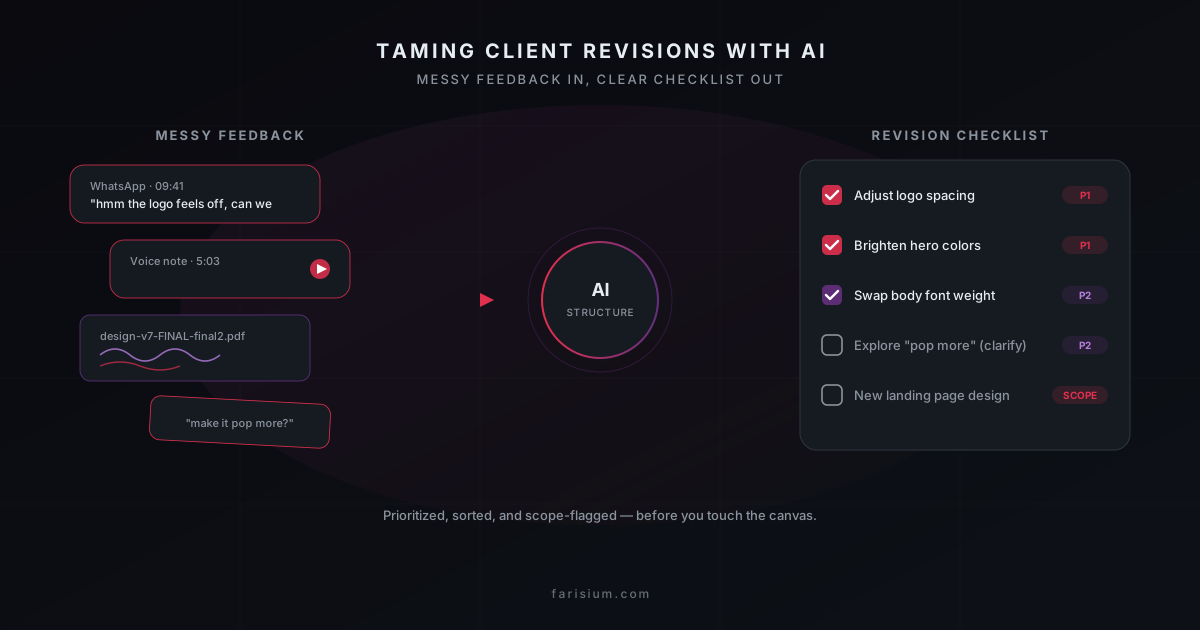
If a revision request has drifted outside the original scope, AI can also help draft a message that's polite but clear about the boundaries of the agreed scope, without sounding defensive. That's one of the communication skills that shapes a freelancer's reputation the most, and AI helps you write it faster when you're tired or frustrated.
Tools Worth Trying
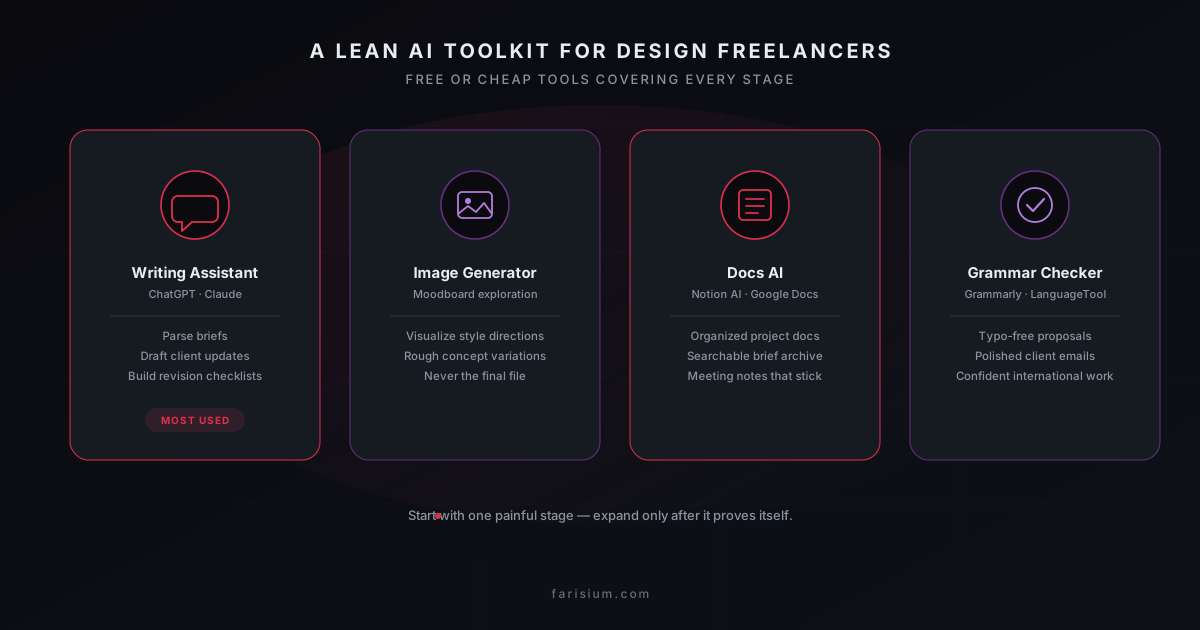
You don't need an expensive subscription to start. A combination of free or cheap tools already covers most of the stages above:
- ChatGPT ↗ or Claude — breaking down briefs, quick research, drafting client communication, building revision checklists.
- An AI image generator like Midjourney ↗ for moodboard exploration and rough concept variations — learn more accurate prompting techniques so results don't come out generic.
- Notion AI ↗ or Google Docs AI — keeping project documentation and briefs organized and searchable.
- Grammarly ↗ / LanguageTool — making sure emails and proposals to international clients are typo-free.
Conclusion
AI doesn't change what freelance design work fundamentally is — clients still pay for taste, judgment, and the ability to turn a business need into visuals that work. What changes is how much time you can now save around that core work: understanding briefs, research, communication, and revisions.
If you're just starting to explore generative AI for visual work, this guide to AI for graphic design is a solid starting point. And if you want to tighten up your whole daily workflow, not just design projects, how to use AI for work productivity covers that in more depth.
Start exploring AI tools that can support your design workflow
Explore Farisium AI ToolsFrequently Asked Questions
Probably not, at least not in the form of a designer with taste, brand context, and the ability to negotiate with clients. What's more likely: designers who use AI to speed up the repetitive parts of their workflow can take on more clients while keeping quality consistent, while designers who reject it entirely fall behind in an increasingly competitive market.
Start with the single most painful part of your current workflow — usually that's parsing briefs or writing client updates. Try it on your next two or three projects, see what actually saves time, then expand from there. You don't need to overhaul your whole workflow at once.
Generally not directly, especially for commercial work. Beyond the fact that fine detail usually still needs manual polish, there's also a licensing risk tied to the training data behind these models. It's safe to use as a visual reference or early exploration material, but final execution should still go through your own hands.
Generative AI, like an image generator, produces visual assets, which is useful for moodboard exploration and rough concepts. An AI writing assistant, like ChatGPT or Claude, works with text, which is useful for parsing briefs, writing client communication, and building revision checklists. Most freelance designers actually need the second one more often, even though the first one looks flashier on the surface.
Related Articles
How to Fact-Check AI Answers: A Practical 7-Step Workflow for Reliable Research in 2026
Learn how to fact-check AI answers with a practical 7-step workflow. Discover how to verify sources, detect hallucinations, compare evidence, and build more reliable AI research habits.
How to Build an AI Workflow That Actually Saves Time in 2026
Learn how to build an AI workflow that saves time instead of adding more tools. This practical framework helps freelancers and small teams choose tasks, design handoffs, add human review, and measure real productivity gains.
How to Build a Private AI Knowledge Base for Small Business: A Practical 2026 Guide
Learn how to build a private AI knowledge base for your small business. This practical guide covers document preparation, retrieval, privacy, testing, access control, and maintenance.

M. Faris Deni K.
Agentic AI Leader. Writing about AI, technology, and platform development.