
Prompt Engineering for AI Anime: How to Craft the Perfect Prompt
Prompt engineering for anime images made simple: 5 core components, advanced techniques, and real examples you can practice today for better results.
Have you ever typed a long, hopeful prompt into an AI image generator, only to get a result that looks nothing like what you imagined? You are not alone. This is the most common challenge faced by AI image generation users — and the good news is, there are techniques you can learn.
In this article, we will explore the art and science of prompt engineering specifically for AI anime image generation. From basic prompt components to advanced techniques and real examples you can immediately try on your favorite AI image generator platform.
What Is Prompt Engineering?
Prompt engineering is the process of designing and crafting text instructions (prompts) to get desired results from generative AI models. The better your prompt, the more likely the AI will generate an image that matches your imagination. This concept is also covered officially in OpenAI's prompt engineering guide ↗, which outlines general strategies that apply across model types.
In the context of AI anime image generation, a good prompt is like giving detailed instructions to an illustrator: you need to describe the subject, style, composition, lighting, and atmosphere you want.
Components of a Good Prompt
An effective prompt consists of several key components. The more complete your prompt, the more accurate the results.
1. Subject
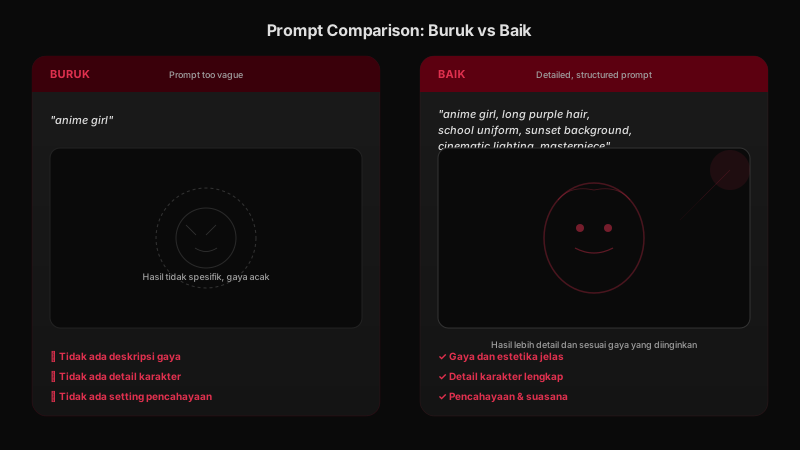
Describe your main subject specifically. Do not just write "anime girl" — add details like hair color, clothing style, facial expression, and pose.
Example: "anime girl with long purple hair, wearing a white school uniform, smiling, standing in a field of flowers" — far more effective than just "anime girl".
2. Style
Specify the visual style you want. Popular choices include: anime style, studio ghibli style, cyberpunk, manga style, watercolor, oil painting, or 3D render.
Adding keywords like "anime style" or "digital painting" helps the model understand the aesthetic you are looking for.
3. Lighting & Atmosphere
Lighting is an often overlooked element that greatly affects output quality. Useful terms include: cinematic lighting, sunset lighting, studio lighting, soft lighting, dramatic lighting, atmospheric, moody, vibrant.
4. Quality Boosters
Add quality keywords at the end of your prompt to push the model toward its best output. Examples: masterpiece, high quality, detailed, sharp focus, 8k, highly detailed face and eyes.
Basic Prompting Techniques
Here are fundamental techniques that will immediately improve your prompt quality.
Write in English
Stable Diffusion ↗ models are trained primarily on English-language datasets. While some models support other languages, the best results almost always come from writing prompts in English. Do not worry — you do not need perfect English, just clear keywords.
Specific Beats General
Simple comparison: "anime girl" vs "1girl, long purple hair, blue eyes, school uniform, sunset, cinematic lighting, masterpiece". The second prompt gives the model 10x more information, resulting in a far more accurate image.
Use Weight Syntax
Some platforms support weight syntax to emphasize or de-emphasize certain elements. Common format: (word:1.2) to strengthen, (word:0.8) to weaken. Example: "(cinematic lighting:1.4), (simple background:0.6)" makes lighting more dramatic and the background simpler.
Use Negative Prompts
Negative prompts tell the model what you do NOT want to see. Example: "ugly, deformed, blurry, low quality, extra limbs, bad anatomy" — this helps the model avoid undesirable results. Stable Diffusion-based interfaces such as the AUTOMATIC1111 Stable Diffusion WebUI ↗ provide a dedicated negative prompt field; similar features exist on other platforms under different names.
Advanced Techniques for Consistent Results
Once the basics click, understanding what happens under the hood makes your prompts far more precise. Modern text-to-image systems like diffusion models work by gradually refining an image from noise toward the final result — guided by every token (word unit) in your prompt. The practical consequence: words at the start of a prompt carry more influence than words at the end, so put your most important elements first.
Another advanced trick: lock the seed when you find a composition you like, then change only one variable per iteration — style, lighting, or pose. This controlled-experiment approach is far more effective than rewriting the whole prompt. Many professional prompt engineers also use large language models like ChatGPT or Claude as prompt-building assistants: ask the LLM to expand a short description into a full subject-style-lighting prompt, then curate the output manually.
Anime-Specific Tips
Here are tips that specifically apply to generating high-quality anime images:
- Start with "anime style" or "anime coloring" to guide the aesthetic.
- Mention studio or artist names for style reference: "Studio Ghibli style", "Makoto Shinkai style".
- Eye detail is crucial in anime — add "detailed eyes", "sparkling eyes" for more lifelike results.
- Use "best quality, masterpiece" as a prompt closer.
- For female characters, use "1girl"; for male "1boy" — this helps the model understand character count.
- Experiment with aspect ratios: portrait (9:16) for single characters, landscape (16:9) for scenery.
Common Mistakes to Avoid
- Prompt too short: just "anime" will not give satisfying results.
- Too many elements: trying to include too much in one image confuses the model.
- Contradictory words: using "dark" and "bright" together confuses the model.
- No negative prompt: negative prompts are just as important as the main prompt.
- Expecting perfection on the first try: prompt engineering is iterative — keep refining.
Conclusion
Prompt engineering is a skill you can learn and continuously improve. By understanding good prompt components, applying basic techniques, and avoiding common mistakes, you will get far more satisfying anime image results.
Remember that every failed prompt is a valuable lesson. Keep experimenting and note which prompts work well. The more you practice, the better your results will be.
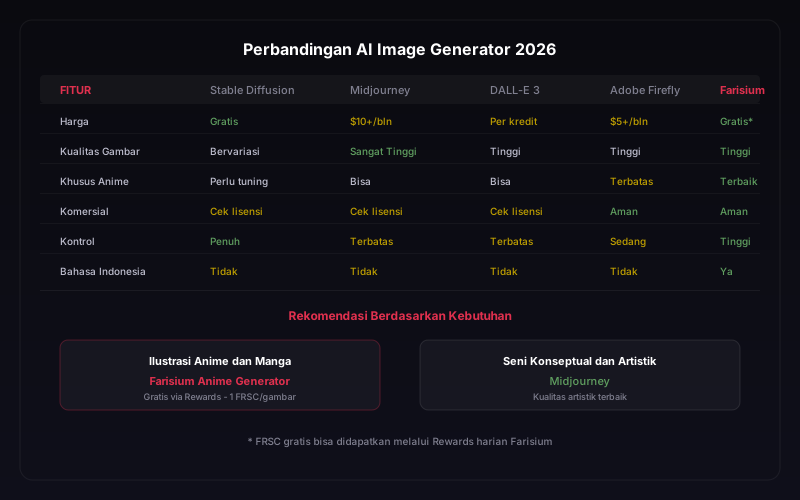
Curious how different AI image generators handle prompts? Check out our complete comparison of the best AI image generators in 2026 for broader insights.
For more structured learning, check out our recommendations for the Best Online AI Courses 2026 suitable for beginners to professionals who want to deepen their prompt engineering and generative AI skills.
Put prompt engineering into practice with Farisium AI tools
Explore Farisium AI ToolsFrequently Asked Questions
The ideal length is 50—150 words. Too short provides insufficient information; too long makes the model lose focus on important elements.
A seed is a random number that determines the starting point of image generation. Using the same seed with the same prompt produces identical images — useful for incremental experimentation.
Not all of them. Negative prompts are a common feature on Stable Diffusion-based platforms, but not available by default in every tool. Check your platform's settings — some show a dedicated field, others integrate it into parameter selection.
Style references like "Makoto Shinkai style" are widely used as aesthetic shorthand and fine for personal use. For commercial work, avoid imitating one specific artist — blend several style references or describe techniques instead (e.g., "soft watercolor background") for more original results.
Related Articles
How to Fact-Check AI Answers: A Practical 7-Step Workflow for Reliable Research in 2026
Learn how to fact-check AI answers with a practical 7-step workflow. Discover how to verify sources, detect hallucinations, compare evidence, and build more reliable AI research habits.
How to Build an AI Workflow That Actually Saves Time in 2026
Learn how to build an AI workflow that saves time instead of adding more tools. This practical framework helps freelancers and small teams choose tasks, design handoffs, add human review, and measure real productivity gains.
How to Build a Private AI Knowledge Base for Small Business: A Practical 2026 Guide
Learn how to build a private AI knowledge base for your small business. This practical guide covers document preparation, retrieval, privacy, testing, access control, and maintenance.
M. Faris Deni K.
Agentic AI Leader. Writing about AI, technology, and platform development.